Is React hard to learn?
Curious if React is worth learning? Understanding whether React is hard to learn helps you approach it with realistic expectations. With the right JavaScript foundation and consistent project practice, mastering React becomes achievable.
React has become one of the most widely used libraries for building modern web interfaces, which is why thousands of developers ask the same question before starting their learning journey: Is React hard to learn?
At first glance, React may appear intimidating because it introduces new concepts such as components, hooks, state management, and JSX. However, when these concepts are understood step by step and applied through projects, React becomes far more approachable than many beginners expect.
The truth is that React is not inherently difficult, but it does require a solid understanding of JavaScript fundamentals and consistent practice. Developers who approach React with a structured learning plan usually discover that the biggest challenge is not the framework itself but learning how modern front-end architecture works.
Learn React 19: The Complete Guide to Modern Web Apps

React remains one of the most widely used libraries for building modern web applications. This course focuses on modern React (React 18+ and emerging React 19 capabilities), covering improvements in rendering, concurrency, and application architecture that help developers build faster and more scalable user interfaces. This course takes you beyond the fundamentals and focuses on building production-ready React applications. You'll learn how to structure large React codebases using feature-based architecture, state ownership principles, context segmentation, reducer patterns, and headless or compound components. You'll also explore React’s rendering internals, including the Fiber architecture, render and commit phases, and modern concurrent rendering patterns using transitions and Suspense, along with performance optimization strategies such as memoization and component profiling. The course then moves into modern async UI patterns, teaching you how to build responsive interfaces using Suspense, server-side and streaming rendering concepts, lazy loading, and error boundaries, along with an introduction to React Server Components (RSC). You'll learn how to manage server data effectively using TanStack Query (formerly React Query), including caching, dependent queries, optimistic updates, and query invalidation. The course also introduces real-time-inspired and offline-first UI strategies, background synchronization, and performance techniques such as using Web Workers for off-main-thread computation. Beyond architecture and data management, you'll learn how to build complex forms, scalable workflows, and accessible user interfaces, along with practical testing strategies using React Testing Library. The course concludes with production-focused topics including accessibility architecture, internationalization (i18n), design systems, security considerations, and deployment practices. You'll be able to design, optimize, and deploy scalable React applications using modern architectural and performance patterns. Throughout the course, you'll apply what you learn through two hands-on projects: Task Manager Dashboard: Build a complete React dashboard that manages tasks, routing, state, and API interactions. Product Launch Readiness Board: Build a modern collaboration tool featuring optimistic updates, offline-capable editing, simulated real-time collaboration (UI-level), Suspense-based lazy loading, and a themeable, internationalized UI.
Understanding Why React Feels Difficult At First#
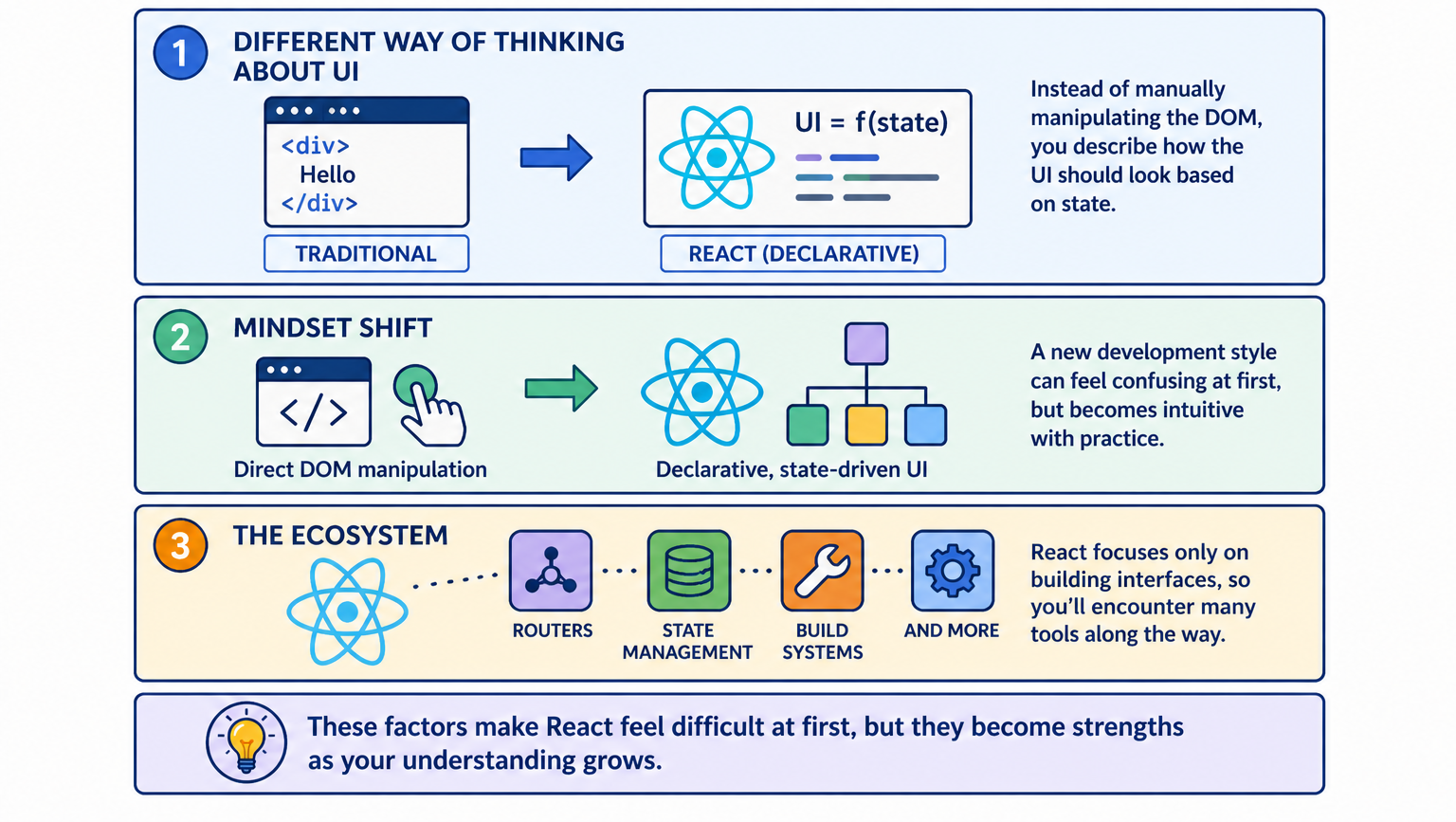
Many beginners assume React will feel similar to traditional HTML and JavaScript development, but React introduces a different way of thinking about user interfaces. Instead of manually manipulating the DOM, developers describe how the interface should look based on application state.
This declarative programming model often requires a mindset shift, especially for developers who previously worked with direct DOM manipulation using vanilla JavaScript or libraries such as jQuery. The change in development style can initially create confusion, even though the underlying ideas become intuitive after some practice.
Another reason React feels challenging early on is the ecosystem surrounding it. React itself focuses only on building interfaces, which means developers often encounter tools such as routers, state management libraries, and build systems shortly after starting their learning journey.
Zero to Hero in Front-end Development with React

Front-end development is a critical part of web applications. Many of the in-demand tech jobs today are for front-end developers. This Skill Path is designed for individuals who are interested in becoming front-end developers but don't have a background in programming. You’ll learn how to design and build efficient and scalable user interfaces using HTML, CSS, JavaScript, and the React framework. By the end of this Skill Path, you’ll have a strong understanding of front-end development concepts and the ability to build your own web applications.
React Learning Difficulty Compared To Other Front-End Technologies#
Developers frequently compare React with other front-end frameworks when deciding what to learn. Understanding these differences helps explain why some developers initially feel React has a steeper learning curve.
Technology | Learning Curve | Core Concept |
HTML & CSS | Easy | Static page structure and styling |
JavaScript | Moderate | Programming logic and browser APIs |
React | Moderate | Component-based UI architecture |
Angular | Hard | Full framework with many built-in systems |
Vue | Moderate | Framework with simplified syntax |
Compared with Angular, React is generally easier to learn because it focuses primarily on the view layer rather than providing a full framework. However, compared with basic HTML or JavaScript, React introduces more architectural thinking, which is why beginners often perceive it as complex during the early stages.
The Prerequisites That Make React Easier To Learn#
One of the most important factors influencing how difficult React feels is the developer’s familiarity with JavaScript. React heavily relies on modern JavaScript syntax, which means developers who skip JavaScript fundamentals often struggle.
Concepts such as arrow functions, array mapping, destructuring, and asynchronous programming appear frequently in React code. Developers who already understand these patterns usually find React much easier to learn because they can focus on component architecture rather than basic syntax.
The following table shows the relationship between JavaScript experience and React learning difficulty.
JavaScript Experience Level | React Learning Difficulty | Estimated Learning Time |
Beginner with minimal JavaScript | High | 4–6 months |
Comfortable with JavaScript basics | Moderate | 2–3 months |
Strong ES6 knowledge | Low | 4–6 weeks |
Experienced front-end developer | Very Low | 2–4 weeks |
Developers who invest time strengthening their JavaScript skills often find that React becomes far easier to understand because many React patterns rely on existing JavaScript concepts.
Core Concepts That Beginners Must Understand#
React applications revolve around several foundational concepts that define how user interfaces are built. These concepts are not necessarily difficult, but they require practice before they feel natural.
Components represent the most fundamental idea in React because every interface is built using reusable pieces of code that describe parts of the UI. Instead of writing large HTML files, developers create smaller components that work together to form complete applications.
State and props introduce another essential concept that determines how data flows through a React application. Props allow components to receive information from parent components, while state enables components to manage dynamic data that changes over time.
React Concept | What It Controls |
Components | Structure of the user interface |
Props | Passing data between components |
State | Managing dynamic information |
Event Handling | Responding to user actions |
Rendering | Updating the UI automatically |
Once developers understand how these concepts interact, React becomes significantly easier to work with because the architecture starts to feel predictable and logical.
Why JSX Confuses Many Beginners#
One of the first things developers notice when learning React is JSX, a syntax that looks similar to HTML but runs inside JavaScript files. JSX allows developers to write UI structures in a familiar format while still using JavaScript logic to control application behavior.
Although JSX looks unusual at first, it quickly becomes intuitive because it allows developers to combine structure and logic in the same place. Instead of switching between HTML files and JavaScript scripts, developers can manage both aspects of the interface within a single component.
Beginners sometimes struggle with JSX because it introduces rules such as returning a single parent element and using JavaScript expressions inside curly braces. These small differences can feel confusing initially, but become second nature after building a few small applications.
Understanding React Hooks#
React hooks represent one of the most powerful features of modern React development. Hooks allow functional components to manage state, perform side effects, and access lifecycle behavior without relying on class-based components.
The most commonly used hooks include useState and useEffect, which handle state updates and side effects such as API calls. Learning these hooks requires understanding how React re-renders components whenever application state changes.
Hook | Function |
useState | Stores and updates component data |
useEffect | Runs side effects such as fetching data |
useContext | Shares data between multiple components |
useRef | References DOM elements |
useMemo | Optimizes expensive calculations |
Although hooks initially feel abstract, developers quickly recognize their usefulness when building interactive applications that depend on dynamic data.
Learn React Hooks for Frontend Development

Web development has changed significantly in recent years. A web developer should not only know the basics of HTML, CSS, and JavaScript but also be proficient in frameworks such as Angular, React, and Vue. These frameworks make web development easier, enabling developers to focus on the application logic. This course is designed for newcomers to React and experienced React developers alike. You’ll start by learning the most fundamental concept in React—components. Specifically, you’ll learn about function components. You’ll then learn how to manage application state and side effects. You’ll then learn about the useMemo hook to boost an application’s performance. You’ll learn about the useContext hook which enables us to perform area updates in our application. Finally, you’ll learn how to create custom hooks in React. After completing this course, you can develop frontend applications with React. You’ll be able to develop complex web applications faster because React makes the process much easier.
The React Ecosystem And Why It Feels Overwhelming#
React itself focuses only on building user interfaces, but real-world applications require additional tools to handle routing, state management, testing, and server communication. The number of available libraries can feel overwhelming to beginners who are unsure which tools they actually need.
For example, developers often encounter React Router when building multi-page applications, Redux or Zustand when managing large application states, and frameworks like Next.js when building production-ready React applications.
Tool | Purpose |
React Router | Navigation between pages |
Redux | Global state management |
Next.js | Server-side rendering and performance |
React Query | API data fetching |
Jest | Testing React components |
The ecosystem becomes easier to navigate once developers understand that most applications only require a few essential tools rather than the entire ecosystem.
A Realistic Learning Timeline For React#
Understanding how long it takes to become comfortable with React helps reduce frustration during the learning process. Developers often assume they should understand everything immediately, which leads to unnecessary pressure.
Learning Stage | Typical Timeframe |
Understanding JSX and components | 1–2 weeks |
Learning props, state, and hooks | 2–3 weeks |
Building small applications | 1–2 months |
Developing real-world projects | 2–3 months |
Becoming job-ready | 4–6 months |
These timelines represent typical experiences for developers who practice consistently while building projects rather than relying solely on tutorials.
Strategies That Make React Easier To Learn#
Developers who succeed in learning React usually adopt a project-driven approach instead of focusing exclusively on theory. Building real applications forces developers to connect multiple concepts together and solve practical problems.
Another helpful strategy involves learning React gradually instead of trying to understand the entire ecosystem immediately. Starting with basic components and simple applications allows developers to build confidence before introducing advanced patterns and libraries.
Consistency also plays an important role in mastering React because little daily progress leads to steady improvement over time. Even short development sessions can significantly accelerate learning when they involve building real projects.
When React Starts To Feel Natural#
Most developers experience a turning point where React suddenly begins to make sense. This moment usually occurs after building several small projects and encountering common patterns repeatedly.
At this stage, developers understand how components communicate, how state updates trigger re-renders, and how hooks manage application behavior. Instead of memorizing syntax, they start thinking about application structure and architecture.
Reaching this level of understanding typically takes a few months of consistent practice, but the experience becomes far more enjoyable once the core patterns become familiar.
Final Thoughts#
Many developers initially worry about whether React will be difficult to learn, but the reality is that React becomes manageable once its core concepts are understood. The biggest challenge usually involves adjusting to component-based architecture rather than learning complex syntax.
Developers who focus on strengthening JavaScript fundamentals, building real projects, and practicing consistently often discover that React becomes one of the most productive tools in modern web development. While the learning curve may feel steep during the early stages, persistence and structured practice gradually transform React into a powerful and intuitive development framework.
