Using Gemini 2.5 to improve coding efficiency with GitHub Copilot
Can Gemini 2.5 boost your productivity alongside GitHub Copilot? Discover how combining strategic reasoning with in-editor AI assistance can accelerate debugging, architecture design, and overall coding efficiency.
If you are already using GitHub Copilot in your daily workflow, you have probably experienced the productivity boost it provides. It completes boilerplate, suggests functions, writes tests, and even explains unfamiliar code patterns. At some point, though, you might start wondering whether adding another advanced model, such as Gemini 2.5, into your workflow could push your efficiency even further.
This question is not about replacing Copilot. It is about amplification. You are essentially asking whether combining Gemini 2.5 with GitHub Copilot creates a complementary system that improves reasoning depth, architectural clarity, and debugging speed beyond what either tool provides alone.
The short answer is that yes, Gemini 2.5 can improve coding efficiency when used strategically alongside GitHub Copilot. However, the improvement depends entirely on how you structure the collaboration between the two tools. If you use them redundantly, you gain little. If you use them intentionally, you can dramatically accelerate your development cycles.
Let’s break this down in a practical and realistic way.
Master GitHub Copilot

GitHub Copilot is redefining how modern software is written, shifting developers from manual coding to AI-assisted development where code is generated, reviewed, and refined in real time. As engineering teams move faster and systems grow more complex, knowing how to effectively use GitHub Copilot is becoming a core productivity skill, not just an advantage. I built this course from my work in intelligent systems and developer tooling, where integrating AI into real development workflows is often the hardest step. A consistent pattern I observed was that developers treated Copilot as autocomplete, rather than a collaborative partner. The difference in outcomes was significant. This course is designed to help you use GitHub Copilot deliberately, guiding it with structured prompts and workflows. You’ll learn GitHub Copilot through hands-on integration in your IDE and CLI, covering inline completions, Copilot Chat, prompt design, unit test generation, debugging, and refactoring. You’ll also explore how Copilot fits into Git workflows, code reviews, and pull request management in real projects. Developers are already using GitHub Copilot to accelerate delivery and improve code quality. If you want to code with AI effectively, this is where you start.
Understanding what each tool is designed to do#
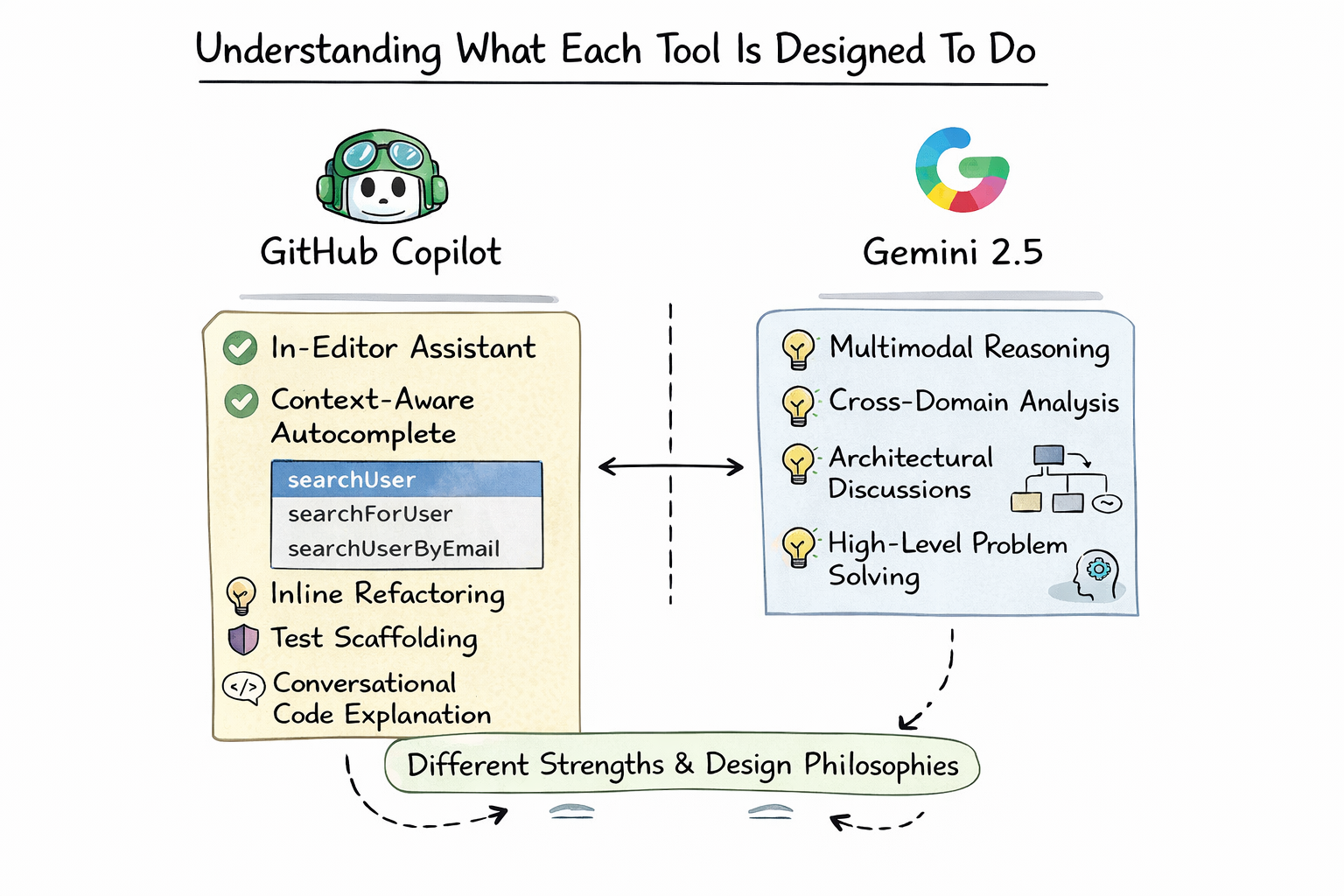
Before evaluating whether Gemini 2.5 improves efficiency when paired with Copilot, you need to understand the design philosophy behind both systems.
GitHub Copilot is built primarily as an in-editor assistant. Its strength lies in context-aware autocomplete, inline refactoring, test scaffolding, and conversational code explanation inside your IDE. It is tightly integrated with your repository, which allows it to reason within the boundaries of your current file and, in higher tiers, across your project.
Gemini 2.5, on the other hand, is a general-purpose large language model with strong multimodal reasoning capabilities. It excels at structured reasoning, cross-domain analysis, architectural discussions, and high-level problem solving. While it can generate code, it is not embedded natively in your IDE in the same way Copilot is.
When you look at both tools side by side, you start to see that they occupy different layers of the development workflow.
Capability | GitHub Copilot | Gemini 2.5 |
Inline autocomplete | Strong | Not IDE-native |
Repository-aware reasoning | Yes (Business/Enterprise) | Limited unless context provided |
High-level architectural planning | Moderate | Strong |
Deep multi-step reasoning | Good | Very strong |
Multimodal analysis | Limited | Advanced |
Code explanation | Strong | Strong with broader reasoning |
Instead of competing directly, they operate at different abstraction levels.
GitHub Copilot for Professionals

This intermediate-to-advanced course is designed for developers familiar with software development who want to integrate Copilot more deeply into their professional workflows. You’ll begin by exploring the Copilot ecosystem, configuring advanced IDE setups, and understanding the ethical use of AI. Next, you’ll explore prompt engineering techniques for prototyping, debugging, and generating clean, production-ready code. You’ll learn to use Copilot for code reviews, architectural refactoring, and security standards. The course also covers GitHub Copilot’s role in team collaboration: writing pull requests, automating CI/CD pipelines, and enhancing developer productivity through the Copilot. You’ll explore the future of autonomous AI agents, learn how to apply organization-wide usage policies, and foster a culture of responsible AI adoption. By the end of this course, you’ll be equipped to use Copilot as a powerful AI partner (not just a code generator) across all stages of software development.
Where GitHub Copilot shines in daily coding#
When you are writing code line by line, Copilot’s value becomes immediately clear. It reduces keystrokes, generates repetitive structures, and predicts patterns based on surrounding context. It excels at local reasoning, meaning it performs best when working within the scope of your current file or function.
For example, if you define a data model and begin writing validation logic, Copilot can anticipate typical patterns and suggest implementations quickly. If you add a comment describing a helper function, it can often generate a reasonable first draft instantly.
This kind of micro-efficiency compounds throughout the day. Even saving a few seconds per function adds up significantly over weeks and months of development.
However, Copilot’s reasoning is bounded by context size and optimization for speed. It is not designed to deeply analyze system-level tradeoffs or perform extended multi-step architectural reasoning.
Where Gemini 2.5 adds unique value#
Gemini 2.5 brings a different kind of strength to your workflow. It excels at structured reasoning across larger conceptual spaces. If you ask it to design a scalable microservices architecture, evaluate tradeoffs between event-driven and request-response patterns, or analyze a complex algorithm’s time complexity in detail, it performs exceptionally well.
When you step outside the file-level scope and begin thinking in terms of system design, cross-service integration, or performance bottlenecks, Gemini 2.5 can provide broader strategic insight.
This is where efficiency gains begin to appear. Instead of manually researching architectural patterns or reading multiple documentation sources, you can use Gemini 2.5 as a structured reasoning assistant before implementing changes in your codebase.
In other words, Gemini 2.5 enhances your macro-level thinking, while Copilot accelerates micro-level implementation.
The layered workflow approach#
The real efficiency improvement emerges when you deliberately separate responsibilities between the tools.
Imagine you are implementing a new feature that involves authentication, database design, and API endpoints. Instead of jumping directly into your editor, you might first use Gemini 2.5 to reason through architectural decisions. You can explore different authentication flows, evaluate JWT versus session-based models, and analyze security implications.
Once you have clarity at the conceptual level, you move into your IDE and let Copilot handle scaffolding, route definitions, and repetitive validation logic.
The result is a layered workflow:
Workflow Stage | Primary Tool |
Architectural planning | Gemini 2.5 |
API design reasoning | Gemini 2.5 |
Code scaffolding | Copilot |
Test generation | Copilot |
Refactoring optimization | Both |
Performance analysis | Gemini 2.5 |
By intentionally assigning tasks to each tool, you prevent overlap and maximize strengths.
Debugging efficiency gains#
Debugging is another area where pairing Gemini 2.5 with Copilot can significantly improve efficiency.
Copilot can help by suggesting potential fixes based on local code context. It might detect common null reference patterns or propose missing imports. However, when a bug spans multiple services or involves architectural misalignment, local suggestions may not be sufficient.
In such cases, you can extract the relevant code and error messages and present them to Gemini 2.5 for broader reasoning. Because it handles extended logical chains well, it can analyze systemic patterns rather than just local syntax issues.
For example, if you encounter intermittent failures in a distributed system, Gemini 2.5 can reason about race conditions, concurrency bottlenecks, and asynchronous timing patterns more holistically.
That combination of local correction from Copilot and systemic reasoning from Gemini 2.5 can shorten debugging cycles significantly.
Refactoring and performance optimization#
Refactoring is often where developers lose time. It requires both understanding existing code and envisioning a cleaner alternative.
Copilot can propose refactored blocks inside your file. It is particularly effective at simplifying repetitive structures or converting synchronous logic to asynchronous patterns.
Gemini 2.5, however, can analyze architectural cohesion and separation of concerns at a broader level. If you paste a module and ask whether it violates single-responsibility principles or introduces hidden coupling, you can receive a more strategic assessment.
When you combine both, the process becomes smoother. Gemini 2.5 identifies what should change conceptually. Copilot implements those changes quickly inside your editor.
Measuring real efficiency improvements#
Efficiency should not be defined abstractly. It should be measurable.
When using both tools intentionally, developers often notice reductions in time spent on research, documentation review, boilerplate writing, and debugging cycles. The cumulative effect is faster feature delivery and fewer context-switching interruptions.
Here is a conceptual comparison:
Scenario | Copilot Alone | Copilot + Gemini 2.5 |
Implementing CRUD API | Fast scaffolding | Fast scaffolding + optimized architecture |
Fixing simple syntax bug | Immediate suggestion | Similar speed |
Debugging distributed issue | Moderate | Faster due to broader reasoning |
Designing scalable system | Limited | Strong improvement |
Writing performance review notes | Manual | Assisted analysis |
The synergy appears most strongly in complex problem spaces rather than in trivial tasks.
Potential drawbacks and limitations#
It is important to remain realistic. Using two AI systems does not automatically double productivity.
If you constantly switch between tools without a clear separation of responsibilities, you may introduce friction. Context switching itself can reduce efficiency. You must use Gemini 2.5 strategically rather than reflexively.
There is also cognitive overhead in verifying AI-generated suggestions. No matter how advanced the model, you remain responsible for correctness and security.
Efficiency gains appear when you use AI as an augmentation rather than a replacement.
Practical integration strategies#
To improve coding efficiency, you should define a deliberate workflow.
Use Gemini 2.5 for planning sessions before opening your IDE. Use it when exploring tradeoffs, learning unfamiliar frameworks, or analyzing architectural changes.
Use Copilot while actively coding, writing tests, or refactoring within your editor.
By separating conceptual reasoning from implementation assistance, you create a structured AI collaboration model rather than a chaotic one.
Final answer#
Yes, Gemini 2.5 can improve coding efficiency when used alongside GitHub Copilot, but only when applied intentionally.
Copilot accelerates micro-level implementation. Gemini 2.5 enhances macro-level reasoning. Together, they create a layered productivity system that improves architectural clarity, debugging depth, and overall development speed.
The real improvement does not come from having more AI. It comes from assigning each AI the right responsibility.
When you combine structured reasoning from Gemini 2.5 with contextual implementation assistance from Copilot, you transform your workflow from reactive coding into guided engineering.
That shift, more than raw speed, is what truly improves efficiency.
