





Front-end development focuses on the user interface and experience, dealing with languages like HTML, CSS, and JavaScript. Back-end development handles server-side operations, databases, and application logic using languages like PHP, Python, Ruby, Node.js, etc.
Table of Contents
Developing Web Applications using PHP
10 mins read
Apr 18, 2024
Share
Simply put, a web application is a program that runs on a browser. This program is stored on the server and is accessible to clients via any browser when required. Specific elements or functions of the web application can be processed and carried out on the server rather than solely within the user’s browser. Facebook, Netflix, Spotify, X (formerly known as Twitter), and YouTube are some famous examples of dynamic web applications that provide online services to millions of users around the globe.
Web communication and HTTP#
Client-server communication must be governed according to some set of rules, also known as protocols. Every web application that is accessible through the browser follows HTTP (HyperText Transfer Protocol). The client sends an HTTP request, and then the server sends an appropriate response.
Communication governed by HTTP
Understanding HTTP requests and responses#
HTTP supports different requests, e.g., GET, POST, PUT, DELETE, etc., against which the server sends a response. For example, what do you think happens when you type “www.google.com" in a browser and hit “Enter” or “Return”? It sends the GET request to the server, and if no problem is encountered, the server returns a status code of 200 along with the Google search page. Otherwise, it will send the relevant status code (404 or something) and an HTML response.
Programming languages in web applications#
To make a web application work, the browser uses a combination of programming languages that are generally categorized as follows:
HTML: A markup language that lets us design and structure content to be displayed on the web browser.
Front-end language: A scripting language that allows for dynamic and interactive elements on a web page to enable client-side interactivity.
Back-end language: While not directly visible to the user, browsers communicate with the web server, which is powered by server-side programming languages.
PHP: A popular web programming choice#
PHP is a
It is a simple language, which is why beginners often prefer it. A PHP website is easy to manage after it is developed. With its combination of speed, flexibility, and control, PHP remains a leading choice for web development. It is one of the most popular solutions in the digital world.
HTML integration: Try your first PHP script#
Create a file, main.php, and add the basic “Hello world!” code to it.
That’s how easy it is to extend HTML. The basic PHP code is enclosed in the <body> of a web page (lines 5–8). In line 6, we initialized a string-type variable, $name. Try changing the value to see the updated result.
If you want a refresher on the basics of PHP, review our PHP scratch course.
How to create a sign-up form in PHP#
Web forms, such as registration forms, are a popular way to interact with users. They are often the first thing users interact with before using the web application. Usually, a username, email, and password are required to set up an account. Let’s make a basic web form.
Client-side implementation#
Create a file, main.php, and add the following code to it:
The above code creates a simple web form via the <form> tag.
Line 4: For the first name, we create the
fname-labeled text field.Line 6: For the last name, we create the
lname-labeled text field.Line 8: For the username, we create the
username-labeled text field.Line 10: For the email, we create the
email-labeled text field.Line 12: For the password, we create the
password-labeled field.
Client-side validation#
What if the user leaves a field blank or enters a wrong value? The data must be validated before sending it to the web server, adjusting the interface in response to user feedback. This is called client-side scripting.
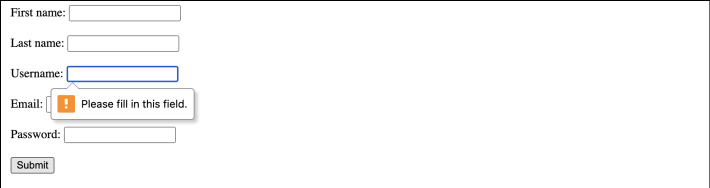
Registration is not complete without a username, email, and password. Therefore, these fields must be completed when filling out the form. Also, the password must be strong for security purposes. User experience (UX) similar to the below illustration must be used to ensure users fill out the form correctly and completely.
1 / 3
Username is missing
We can use HTML 5 and JS for client-side validation without submitting anything to the server. Update the main.php file as follows:
Lines 34–48: We define the
validateForm()function to validate if the email and password follow the correct pattern.Line 35: We create the
isvalidvariable to track if the form is valid.Line 36: We create the
errorElementsvariable to retrieve all elements in the document that have the class nameerror.Lines 39-41: We ensure that error messages are hidden initially when the form is submitted or revalidated. This provides a clean slate for displaying only the relevant error messages.
Line 44: Websites want users to create a strong password matching a specific pattern. We call the
validatePassword()method.Lines 10–19: The
passwordPatternvariable defines the rule that a password’s length should not exceed eight and must contain one uppercase, lowercase, number, and special character. The value entered in thepassword-labeled field is verified. If it doesn’t match the criteria,passwordErroris displayed.
Line 45: Websites want users to enter a valid email. We call the
validateEmail()method.Lines 22–31: The
emailPatternvariable defines the rules of valid email. The value entered in theemail-labeled text field is verified. If it doesn’t match the criteria,emailErroris displayed.
Line 53: When the user fills out the form and clicks the “Submit” button, the form data is sent to the
validateForm()function.Line 58, 61, and 64: Notice the
requiredattribute. A username, email, and password are required for registration. It won’t let the user submit the form if these fields are empty.Line 59, 62, and 65: Error messages are displayed with CSS styling applied for username, email, and password, respectively.
Server-side implementation#
Also known as back-end development, this refers to a program that runs on a server. Client(s) do not have access to this type of programming. Operations like sanitizing, hashing/encrypting the data, and connecting websites to databases are implemented on the server side.
Sanitizing the data#
We can sanitize data both on the client and server side. Client-side sanitization helps improve user experience by providing immediate feedback to the user, while the latter is crucial for security and data integrity.
We can use FILTER_SANITIZE_EMAIL to remove illegal characters from an email address.
Notice how the parentheses are removed from the email address.
Tip: Try using server-side validation rather than relying solely on client-side validation. Unlike server-side validation, client-side validation can be circumvented.
Hiding private information#
It’s unsafe to add passwords as plain text in the database. A hacker may access the stored passwords associated with each email. The solution is to make passwords unreadable to the outside party, a technique known as hashing.
The password_hash() function takes two arguments: the password and the hashing algorithm. In this example, we use the PASSWORD_DEFAULT algorithm (You can find more hashing algorithms in
Database integration#
To register, the user must enter a unique username. Now, imagine millions of users using a website managed by multiple servers. Where do you think the data of a million users is stored? The answer is “a database.”
When a user tries to register, the server verifies the credentials from the database. If no duplicate exists, only then the user’s account will be created. The same applies to a login request. When a user tries to log in, the server verifies the credentials from the database. If such a record exists, only then the user can access services.
Data verification
For example, the server stores the information passed during the successful registration in the Users table, which is a part of the website’s database.
username | fname | lname | password | |
BillJoe_123 | Bill | Joe | bill.joe@gmail.com | nqi01w12nwjx |
RoboRhapsody | Kim | Adams | kim.adams@gmail.com | 9e2hjdwA7@8 |
SteveeTim_456 | Steve | Tim | steve.tim@gmail.com | B928hwq%q1 |
The following steps need to be performed:
Connect to your database.
Receive data from the web form via the
POSTrequest.Insert a value in the database.
Create a file, register.php, and add the following code to it:
Registration successful: User record added in the database
In the above example, the server is connecting to an SQL database.
Lines 2–5: We create a few variables,
$servername,$username,$password, and$dbname, to establish a connection with the database. Do not forget to change the values according to your database’s credentials.Lines 8–13: We establish the connection through the
mysqli()function.Lines 15–21: We fetch data from the web form received via the
POSTrequest. In line 20, we sanitize the email before entering it into the database. Notice line 38 ofindex.html. The form data is sent for processing to a PHP file namedregister.phpvia thePOSTmethod.Lines 25–30: We insert data in the database via an SQL query.
The server should validate the data, check for any possible errors, and filter the unwanted data before entering it into the database.
Sessions and cookies#
In web development, both sessions and cookies are used to maintain the app state and manage user interactions.
Sessions help manage user-specific data throughout their interaction with a web application. This allows for personalized user experiences by storing user preferences.
To use sessions in PHP, we need to start a session at the beginning of our script:
session_start();
We can store user-specific information in session variables:
$_SESSION['username'] = 'BillJoe_123';
We can access session variables:
$userName = $_SESSION['username'];
We should log out or end the session when the user logs out or after a period of inactivity:
session_destroy();
Cookies are small pieces of data stored on the client’s browser, which are sent back to the server with subsequent requests. They help maintain state information between requests, which is crucial for tracking user activities.
We can set a cookie to store information on the user’s browser:
setcookie('username', 'BillJoe_123, time() + 3600, '/');
Here, username is the cookie. “BillJoe_123” is the value of the cookie. The expiry time is time() + 3600. The path for which the cookie is valid is '/'.
We can access cookie values:
$username = $_COOKIE['username'];
We should remove a cookie when it’s no longer needed:
setcookie('username', '', time() - 3600, '/');
Securing PHP applications#
We can follow these best practices to enhance the security of our PHP applications:
Always validate user input to prevent attacks and other security vulnerabilities.
Implement error handling to provide minimal information to users while logging detailed errors for developers.
Avoid storing sensitive information in cookies and use sessions for server-side storage.
Set reasonable session expiration times to mitigate the risk of session hijacking.
Always stay informed about the latest security recommendations.
Regularly audit your codebase for security attacks and implement monitoring to detect suspicious activities.
Keep your PHP version, libraries, and frameworks up to date.
Conclusion#
Before you start actually writing some code, it’s important to think about your project first. Starting coding straight away won't serve you right. Take a seat, relax, and decide on the technologies you want to use. Which server do you want to use? Where will you store the data and host your PHP application? What is the best framework to use? These questions must be answered.
You can consider Apache or Nginx for your server, MySQL or PostgreSQL for your database, and Laravel or Symfony as a PHP framework. You can set up a local development environment using options like XAMPP and MAMP or configure PHP with a web server like Apache. The local development environment allows programmers to test and debug their projects before deploying them to a live server.
Whatever is discussed above is just the tip of the iceberg. To learn more, take our course Developing Web Applications with PHP, which is designed for people who have already learned the basics of PHP and want the bigger picture of making big web applications with PHP.
Happy learning!
Frequently Asked Questions
What is the difference between front-end and back-end development?
What is the difference between front-end and back-end development?
What is the difference between POST and GET methods in form submission?
What is the difference between POST and GET methods in form submission?
How can I redirect users after a successful sign-up?
How can I redirect users after a successful sign-up?
How can I validate form inputs in PHP?
How can I validate form inputs in PHP?
Written By:
Maham Amjad
Related Courses
Learn HTML, CSS, and JavaScriptWeb Development: A PrimerDjango: Python Web Development UnleashedAgile Web Development Using Rails 6Web Development with Golang and BeegoWeb Development: Unraveling HTML, CSS, and JavaScriptWeb Development with MVC Architecture and E-commerce in LaravelScalable Web Development in RustModern Web Design Using Bootstrap 5 with Hands-On ProjectsCreating Long-Lived Web Apps with Ruby on RailsWordPress—A Complete GuideBuilding Front-End Web Applications with Plain JavaScriptHTML for Front-end InterviewsThe Django Admin for Web DevelopersUnderstanding the Basics of Tailwind CSS
