Global Event Handling and Interactive UI
Explore how to use React's useRef hook to manage DOM elements and detect clicks outside a component. Learn to implement global event listeners to control UI visibility, such as dismissing menus when clicking outside. This lesson will help you enhance interactivity in React applications by combining refs with state and effects.
We'll cover the following...
Reactivity with refs
A ref is powerful. Because React makes things very
Clicking outside the menu
Say we have a component, and we want to know when the user clicks outside of it. This is a very popular feature for a popup menu or a modal. Once the menu is visible, we want to dismiss it when the user clicks anywhere outside of it:

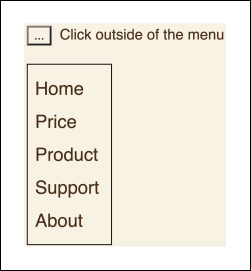
Let's say we have a Menu component displaying a list of menu items:
const Menu = () => {// State variable 'on' to control the visibility of the menuconst [on, setOOn] = useState(true);// If 'on' is false, return null to render nothingif (!on) return null;// If 'on' is true, render the menureturn (// Unordered list containing navigation items<ul>{/* Navigation items */}<li>Home</li><li>Price</li><li>Produce</li><li>Support</li><li>About</li></ul>);}
In the preceding code, an on state is created and set to true initially, making a list of the menu items visible. However, when we click outside of this list, we'd want to set on to false to hide it. For simplicity, here we define ...