Table Context Example
Explore the use of React context to design flexible and dynamic table components. This lesson covers customizing table cells, managing rows and columns through context, and implementing state changes like deleting rows. Understand how context enhances component design and simplifies state management across nested table elements.
We'll cover the following...
Table component design
Another usage of context is to apply the context to a place that can be small but big enough to contain many relevant components inside, such as a table. See the image below:

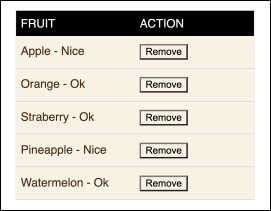
A table can be quite complex in a modern UI. It contains a header, a body, a footer, a pagination, and a customizable column setting to drive the look and feel of cells. Moreover, all these elements can be assembled in a mix-and-match way on the fly to suit different business purposes.
Customizing table cells
A table is made up of rows and columns of cells where each cell can be controlled by a cell component, such as DefaultCell:
const DefaultCell = ({ value }) => {return <div>{value}</div>;}
The prop value is used to pass in a primitive value from a property of a row, such as a string or a number. In a typical case, we simply display it as a string format, as in the preceding code.
Customizing cells based on data
Given a table row tracking a list of fruits:
// Array of fruits with title and optional status propertiesconst fruits = [{ title: 'Apple', status: true },{ title: 'Orange' },{ title: 'Strawberry' },{ title: 'Pineapple', status: true },{ title: 'Watermelon' }];
The preceding column for title is a perfect example, and it should display a list of fruit names. However, not all cells are plain strings, since we can display a cell as a status indicator, a progress bar, a checkbox, and so on. In our case, we have a column for status indicating whether the fruit tastes "nice" or just "OK," which can be handled by another cell behavior:
const StatusCell = ({ value }) => {// Determine the status message based on the truthiness of the 'value' propconst statusMessage = value ? 'Nice' : 'Ok';// Render the status message inside a divreturn <div>{statusMessage}</div>;}
In the custom StatusCell component, the value passed in is a boolean, and it displays either Nice or Ok.
Dynamic cell rendering
This means we need a generic TableCell where we can pass in some sort of column information to customize the display:
const TableCell = ({ col, row }) => {// Extract the value from the specified column of the rowconst value = row[col.name];// Determine the component to render based on the 'Cell' property of the column or use the default 'DefaultCell'const Component = col.Cell || DefaultCell;// Render the determined component with the extracted valuereturn <Component value={value} />;}
In the TableCell component, a col prop is provided to describe how a cell should update. Let's take a look at the information in two columns for both title and status ...