
Use the strcat() or string.h function to concatenate a string to itself in C.
Table of Contents
How to concatenate strings in C: A five-minute guide
19 mins read
May 13, 2026
Share
Modifying strings is an important programming skill. Concatenation involves appending one string to the end of another string.
For example, say we have two strings: “C programming” and “language”. We can use concatenation to generate the output, “C programming language.”
There are a few ways we can append or concatenate strings in C. This quick tutorial teaches you how to concentrate two strings using the strcat() function.
Get hands-on with C today.
Learn C Programming
Learning C programming remains one of the most valuable investments you can make as a developer. It’s the language that sits closest to the machine, powering operating systems, embedded systems, and performance-critical applications. More importantly, it shapes how you understand memory, execution, and the fundamentals behind modern programming languages. I designed this roadmap after seeing how differently people approach learning C programming. Some jump straight into syntax, others get stuck on pointers, and many never connect the pieces into a cohesive understanding. The goal here is to give you a structured, adaptive path that meets you where you are and pushes you forward in the right direction. The roadmap adjusts based on your experience. If you’re starting fresh, you’ll build a strong foundation in C. programming fundamentals like control flow, functions, and problem-solving. If you already know the basics, you’ll go deeper into memory management, pointers, and how programs interact with hardware. As you progress, you’ll work through hands-on exercises, practical challenges, and advanced topics like structs, enums, and performance-focused programming. By the end, you’ll understand how software really works under the hood, and that perspective will carry over into every language and system you work with.
Strings refresher in C#
A string is one of the most popular data types in programming. It is a collection of characters grouped together. Under the hood, strings are actually arrays of characters. Just like arrays, we can access string elements through indexing.
The C language can be slightly awkward when it comes to dealing with strings, especially compared to languages like Python. In C, a string is denoted with the help of a character array. A string can be declared with the syntax below.
Below, variable a is a character array where you can store up to 10 characters.
char a[10].
And it can be initialized as follows:
-
The C program automatically inserts the null character as shown to the right.
-
A null character is provided by the compiler, implicitly, in the style of initialization as seen to the right.
char stringName [stringSize] = { 'S' , 'a' , 'n' , 'j' , 'a' , 'y' , '\0' } ;
char stringName [stringSize] = "Sanjay" ;
Let’s put these concepts together with two examples.
In C, strings are always null-terminated. This means that the last element of the character array is a “null” character, abbreviated \0. When you declare a string as in line 8 above, the compiler does this for you.
Constant character strings are written inside double-quotation marks (see line 5 below), and single character variables are declared using single-quotation marks (see line 7 below).
We can use the sizeof() function to inspect our character string above to see how long it actually is:
Modifying Strings#
In C, it is a bit tricky to modify a declared string. Once a string is declared to be a given length, you cannot just make it longer or shorter by reassigning a new constant to the variable.
There are many built-in functions for modifying strings. Consider two strings s1 and s2. Here are few built-in functions that are available in the string.h header file:
strlen(s1): returns the length of a string.strcpy(s1, s2): copies strings2tos1strrev(s1): reverses the given stringstrcmp(s1, s2): returns 0 ifs1ands2contain the same string.strcat(s1, s2): concatenates two strings
Start learning C today!
Learn C Programming
Learning C programming remains one of the most valuable investments you can make as a developer. It’s the language that sits closest to the machine, powering operating systems, embedded systems, and performance-critical applications. More importantly, it shapes how you understand memory, execution, and the fundamentals behind modern programming languages. I designed this roadmap after seeing how differently people approach learning C programming. Some jump straight into syntax, others get stuck on pointers, and many never connect the pieces into a cohesive understanding. The goal here is to give you a structured, adaptive path that meets you where you are and pushes you forward in the right direction. The roadmap adjusts based on your experience. If you’re starting fresh, you’ll build a strong foundation in C. programming fundamentals like control flow, functions, and problem-solving. If you already know the basics, you’ll go deeper into memory management, pointers, and how programs interact with hardware. As you progress, you’ll work through hands-on exercises, practical challenges, and advanced topics like structs, enums, and performance-focused programming. By the end, you’ll understand how software really works under the hood, and that perspective will carry over into every language and system you work with.
Common ways to concatenate strings in C#
String concatenation is one of the most common operations in C programming. Whether you're building log messages, formatting output, processing user input, or working with file paths, you'll often need to combine multiple strings into a single result.
Unlike higher-level languages, C does not provide a built-in string type. Strings in C are simply arrays of characters terminated by a null character ('\0'). Because of this, concatenating strings requires careful memory management and attention to buffer sizes to avoid common bugs like buffer overflows and missing null terminators.
Using strcat()#
The strcat() function appends one string to the end of another. It works by finding the null terminator at the end of the destination string and then copying the characters from the source string starting at that position.
Because strcat() does not check buffer size, the destination array must already have enough space to hold both strings and the final null terminator.
Syntax#
char *strcat(char *dest, const char *src);
Code example#
#include <stdio.h>#include <string.h>int main() {char firstName[50] = "Hello, ";char secondName[] = "world!";strcat(firstName, secondName);printf("%s\n", firstName);return 0;}
Output explanation#
The program starts with the string "Hello, " stored inside firstName.
Hello, \0
strcat() searches for the null terminator ('\0') at the end of the destination string and starts copying characters from secondName.
After concatenation, the array becomes:
Hello, world!\0
The final output is:
Hello, world!
Pros and cons#
Pros#
Simple and easy to use
Readable for beginners
Available in the standard C library
Cons#
Unsafe if the destination buffer is too small
Can cause buffer overflows
No built-in boundary checking
Best use cases#
strcat() works best when:
Buffer size is fully controlled
Concatenating small fixed strings
Writing simple educational programs
Avoid using it in production code unless buffer safety is guaranteed.
Using strncat()#
The strncat() function works similarly to strcat(), but it limits how many characters are appended from the source string. This reduces the risk of buffer overflow when used correctly.
It still appends a null terminator automatically, so you must leave room for one extra character.
Syntax#
char *strncat(char *dest, const char *src, size_t n);
Code example#
#include <stdio.h>#include <string.h>int main() {char message[20] = "Hello, ";char name[] = "Alexander";strncat(message, name, 4);printf("%s\n", message);return 0;}
Output explanation#
The destination string initially contains:
Hello, \0
strncat() copies only the first four characters from "Alexander":
Alex
The resulting string becomes:
Hello, Alex
Final output:
Hello, Alex
Pros and cons#
Pros#
Safer than
strcat()Limits appended characters
Helps reduce overflow risks
Cons#
Still requires careful buffer calculations
Easy to misuse if
nis chosen incorrectlyLess intuitive for beginners
Best use cases#
strncat() is useful when:
You want controlled concatenation
Working with partially trusted input
Limiting appended characters intentionally
It is often preferred over strcat() for safer string handling.
Using sprintf()#
The sprintf() function formats data and writes the result into a string buffer. It can concatenate strings while also inserting variables, numbers, or formatted output.
Unlike strcat(), sprintf() creates the final string directly instead of appending piece by piece.
Syntax#
int sprintf(char *str, const char *format, ...);
Code example#
#include <stdio.h>int main() {char result[100];char firstName[] = "John";int age = 25;sprintf(result, "Name: %s, Age: %d", firstName, age);printf("%s\n", result);return 0;}
Output explanation#
sprintf() processes the format string:
"Name: %s, Age: %d"
It replaces:
%swith"John"%dwith25
The final string stored in result becomes:
Name: John, Age: 25
Pros and cons#
Pros#
Supports formatting and concatenation together
Very flexible
Easy to build complex strings
Cons#
Unsafe if buffer size is unknown
Can easily overflow buffers
Harder to debug formatting errors
Best use cases#
sprintf() is useful when:
Building formatted strings
Combining text with numbers
Generating logs or reports
However, modern C code usually prefers snprintf() for better safety.
Using snprintf()#
The snprintf() function works like sprintf(), but it includes buffer size checking. This makes it one of the safest and most recommended ways to concatenate and format strings in modern C programming.
It ensures that no more than the specified number of bytes are written to the destination buffer.
Syntax#
int snprintf(char *str, size_t size, const char *format, ...);
Code example#
#include <stdio.h>int main() {char buffer[30];char city[] = "Karachi";int temperature = 35;snprintf(buffer, sizeof(buffer),"City: %s, Temp: %dC",city,temperature);printf("%s\n", buffer);return 0;}
Output explanation#
snprintf() formats the string and ensures the result does not exceed the buffer size.
Even if the final output is larger than the buffer, the function safely truncates the string while preserving null termination.
The resulting output is:
City: Karachi, Temp: 35C
Pros and cons#
Pros#
Much safer than
sprintf()Prevents most buffer overflow issues
Supports formatting and concatenation
Preferred in production code
Cons#
Slightly more verbose
Requires buffer size calculations
Best use cases#
snprintf() is ideal for:
Production applications
Secure string handling
Embedded systems
Logging systems
Formatted output generation
Modern C programs generally prefer snprintf() because safety matters far more than saving a few keystrokes.
Using manual pointer arithmetic#
Manual pointer arithmetic shows how string concatenation works internally. Instead of using library functions, you directly move through memory using pointers and copy characters one by one.
This approach is educational because it helps you understand:
Null terminators
Memory traversal
Character copying
Low-level string representation
Code example#
#include <stdio.h>int main() {char first[50] = "Hello ";char second[] = "World";char *dest = first;char *src = second;while (*dest != '\0') {dest++;}while (*src != '\0') {*dest = *src;dest++;src++;}*dest = '\0';printf("%s\n", first);return 0;}
Output explanation#
The program performs concatenation manually:
The
destpointer moves to the null terminator of"Hello "Characters from
"World"are copied one by oneA new null terminator is added at the end
The final string becomes:
Hello World
Pros and cons#
Pros#
Excellent for learning low-level memory concepts
Gives full control over string operations
No dependency on library functions
Cons#
More complex and error-prone
Easier to introduce bugs
Less readable than standard library functions
Best use cases#
Manual pointer arithmetic is useful for:
Learning how strings work internally
Embedded systems with minimal libraries
Performance-critical low-level code
For most real-world applications, standard library functions are easier and safer.
Comparison of string concatenation methods in C#
Method | Safe? | Formatting support? | Performance | Ease of use | Best for |
| No | No | Fast | Very easy | Small controlled programs |
| Moderately | No | Fast | Easy | Limited-size concatenation |
| No | Yes | Moderate | Easy | Complex formatted strings |
| Yes | Yes | Moderate | Easy | Production-safe applications |
Manual pointers | Depends on implementation | No | High | Difficult | Low-level learning and optimization |
Which method should you use?#
Choosing the right method depends on your application's safety requirements, complexity, and performance goals.
Use snprintf() for modern production code#
If safety matters—and it usually does—snprintf() is the best default choice. It prevents buffer overflows while supporting flexible formatting.
Use strncat() when limiting appended characters#
If you only need to append part of a string or want stricter control over concatenation length, strncat() is safer than strcat().
Use strcat() only when buffer safety is guaranteed#
strcat() is simple, but dangerous if memory sizing is incorrect. It should only be used when the destination buffer is carefully managed.
Use manual pointer arithmetic for learning#
If you want to understand how strings work internally in C, manual concatenation is extremely valuable educationally. It teaches memory traversal and null termination at a low level.
Common mistakes when concatenating strings in C#
Buffer overflows#
One of the biggest risks in C programming is writing beyond allocated memory.
char buffer[10] = "Hello";strcat(buffer, " World");
The buffer is too small, which can cause undefined behavior or crashes.
Missing null terminators#
C strings must always end with '\0'. Forgetting to add a null terminator can make functions continue reading random memory.
Insufficient memory allocation#
Always calculate space for:
Original string
Appended string
Final null terminator
For example:
char buffer[20];
This buffer can only safely store up to 19 visible characters because one byte is reserved for '\0'.
Careful memory management is one of the most important skills in C programming, especially when working with strings.
String concatenation with C#
String concatenation is the process of combining two or more strings into a single string. There are several ways to perform string concatenation in C, depending on the type of strings or concatenation operators being used and the specific needs of the program. Concatenation operators are syntax elements used to perform this operation on strings. In the C language, there are two concatenation operators that can be used to concatenate strings. These are the plus operator (+) and the compound assignment operator (+=).
When used with strings, the plus operator is also known as the string concatenation operator. It creates a new string by joining two existing strings together. The compound assignment operator is used to concatenate two strings and store the result back in the left-hand side string. This operator is equivalent to using the strcat() function to concatenate strings.
A common method of string concatenation in C is to use string literals. A string literal is a sequence of characters enclosed in double quotes, and is represented as an array of characters in memory. To concatenate two string literals, you can simply place them next to each other within the same set of double quotes. For example:
In this example, the two string literals "Hello, " and “world!” are concatenated to create the string “Hello, world!”.
Another method of string concatenation in C involves using string variables. A string variable directs to a character array stored in memory, and can be used to store a string value. To concatenate two string variables, you can use the strcat() function (more on that function later), which appends the second string to the end of the first string. For example:
In this example, the strcat() function is used to append the string value of str2 to the end of str1, resulting in the concatenated string “Hello, world!”.
Why strcat() can be dangerous: Understanding buffer overflows#
String concatenation may seem harmless at first, but in C, even a simple operation like appending text can introduce serious memory safety issues. One of the biggest risks comes from using strcat() without carefully managing buffer sizes.
Because C gives programmers direct access to memory, functions that ignore memory boundaries can accidentally overwrite nearby data. This type of bug is known as a buffer overflow, and it has historically been responsible for crashes, security vulnerabilities, and major software exploits in real-world systems.
What is a buffer overflow?#
A buffer overflow occurs when a program writes more data into a memory buffer than the buffer was allocated to hold.
In C, strings are stored as arrays of characters ending with a null terminator ('\0'). When you concatenate strings, the destination buffer must have enough space for:
The original string
The appended string
The final null terminator
The problem with strcat() is that it does not check whether the destination buffer is large enough before writing data.
How strcat() works internally#
Conceptually, strcat() performs these steps:
Finds the null terminator at the end of the destination string
Starts copying characters from the source string
Continues copying until the source string ends
Adds a new null terminator
The function assumes the programmer has already allocated enough memory.
Here’s the critical issue: if the destination buffer is too small, strcat() keeps writing anyway.
That means it can overwrite:
Adjacent variables
Program state
Stack memory
Heap memory
Return addresses in severe cases
This leads to undefined behavior, meaning the program may:
Crash immediately
Corrupt data silently
Behave unpredictably
Introduce security vulnerabilities
Why buffer overflows matter#
Buffer overflows are not just programming mistakes—they are a major software security concern.
Historically, many vulnerabilities in C and C++ applications happened because programs trusted unsafe string functions without validating memory boundaries.
Common consequences include:
Program crashes
Corrupted files or data
Random application behavior
Remote code execution vulnerabilities
System instability
Even small bugs can become dangerous in security-sensitive applications like:
Operating systems
Network servers
Embedded devices
Database engines
Firmware
This is why modern defensive programming strongly emphasizes memory safety.
Unsafe strcat() example#
The following program demonstrates a classic buffer overflow problem.
#include <stdio.h>#include <string.h>int main() {char destination[10] = "Hello";char source[] = " World!";strcat(destination, source);printf("%s\n", destination);return 0;}
Why this code is unsafe#
The destination buffer has space for only 10 characters:
H e l l o \0
Current usage:
"Hello"= 5 characters'\0'= 1 character
Remaining free space:
Only 4 bytes
But " World!" requires:
7 additional characters
Plus another null terminator
The final string would need:
"Hello World!"
Total size required:
12 characters + null terminator
The buffer only holds 10.
What happens internally#
Before concatenation:
destination buffer:+---+---+---+---+---+---+---+---+---+---+| H | e | l | l | o | \0| | | | |+---+---+---+---+---+---+---+---+---+---+
After strcat() starts writing:
+---+---+---+---+---+---+---+---+---+---+| H | e | l | l | o | | W | o | r | l |+---+---+---+---+---+---+---+---+---+---+continues writing...
The remaining characters overflow beyond allocated memory.
This means the function writes into memory it does not own.
The result may appear to work temporarily on some systems, but the behavior is undefined and dangerous.
Safe alternative: Using strncat()#
The strncat() function allows you to limit how many characters are appended.
#include <stdio.h>#include <string.h>int main() {char destination[10] = "Hello";char source[] = " World!";strncat(destination,source,sizeof(destination) - strlen(destination) - 1);printf("%s\n", destination);return 0;}
Why this is safer#
The expression:
sizeof(destination) - strlen(destination) - 1
calculates:
Remaining buffer space
While reserving space for the null terminator
This prevents writing past the allocated memory boundary.
The resulting string may be truncated safely instead of corrupting memory.
Possible output:
Hello Wor
Truncation is usually far safer than memory corruption.
Safe alternative: Using snprintf()#
Modern C programs often prefer snprintf() because it combines formatting and boundary checking.
#include <stdio.h>int main() {char buffer[10];snprintf(buffer,sizeof(buffer),"%s%s","Hello"," World!");printf("%s\n", buffer);return 0;}
Why snprintf() is preferred#
snprintf():
Limits the number of bytes written
Preserves null termination
Prevents most overflow-related bugs
Supports formatting and concatenation together
Even if the output exceeds the buffer size, the function safely truncates the result.
Possible output:
Hello Wor
This makes snprintf() one of the safest standard-library approaches for string handling in C.
Visualizing memory boundaries#
Memory buffers in C have fixed sizes.
Imagine a character array as a row of boxes:
char name[8];
Memory layout:
+---+---+---+---+---+---+---+---+| | | | | | | | |+---+---+---+---+---+---+---+---+
If you try storing more than 8 bytes, the extra data spills outside the allocated boundary.
That overflow can overwrite nearby memory:
Allocated buffer:+---+---+---+---+---+---+---+---+| H | e | l | l | o | ! | ! | \0|+---+---+---+---+---+---+---+---+Overflowing write:+---+---+---+---+---+---+---+---+---+---+| H | e | l | l | o | W | o | r | l | d |+---+---+---+---+---+---+---+---+---+---+^writing beyond boundary
This is why memory-safe programming matters so much in C.
Best practices for safe string concatenation#
Always allocate enough memory#
Before concatenating strings, calculate space for:
Existing content
Appended content
Null terminator
Prefer snprintf() in production code#
Modern defensive programming favors safer functions that enforce memory boundaries automatically.
Validate string lengths before concatenation#
Never assume user input or external data will fit inside a fixed buffer.
Avoid unsafe functions in security-critical systems#
Functions like:
strcat()sprintf()gets()
can introduce serious vulnerabilities if used carelessly.
In fact, gets() was removed from the C standard because it could not safely prevent buffer overflows.
Use dynamic memory allocation when needed#
If string sizes are unpredictable, allocate memory dynamically using:
malloc()calloc()realloc()
This reduces the risk of fixed-buffer limitations.
Always preserve null termination#
Every valid C string must end with '\0'. Missing null terminators can cause functions to read unintended memory regions.
Why modern systems programming emphasizes memory safety#
Over the years, memory-related bugs have caused countless security problems in low-level software. This is one reason why languages like Rust have gained popularity—they enforce memory safety rules at compile time and prevent many overflow-related bugs automatically.
However, C still remains extremely important in:
Embedded systems
Operating systems
Device drivers
High-performance software
Real-time systems
Because of its speed and low-level control, C is unlikely to disappear anytime soon.
That makes secure C programming an essential skill. Understanding how buffer overflows happen—and how to prevent them—is a critical part of writing reliable systems software.
How to append one string to the end of another#
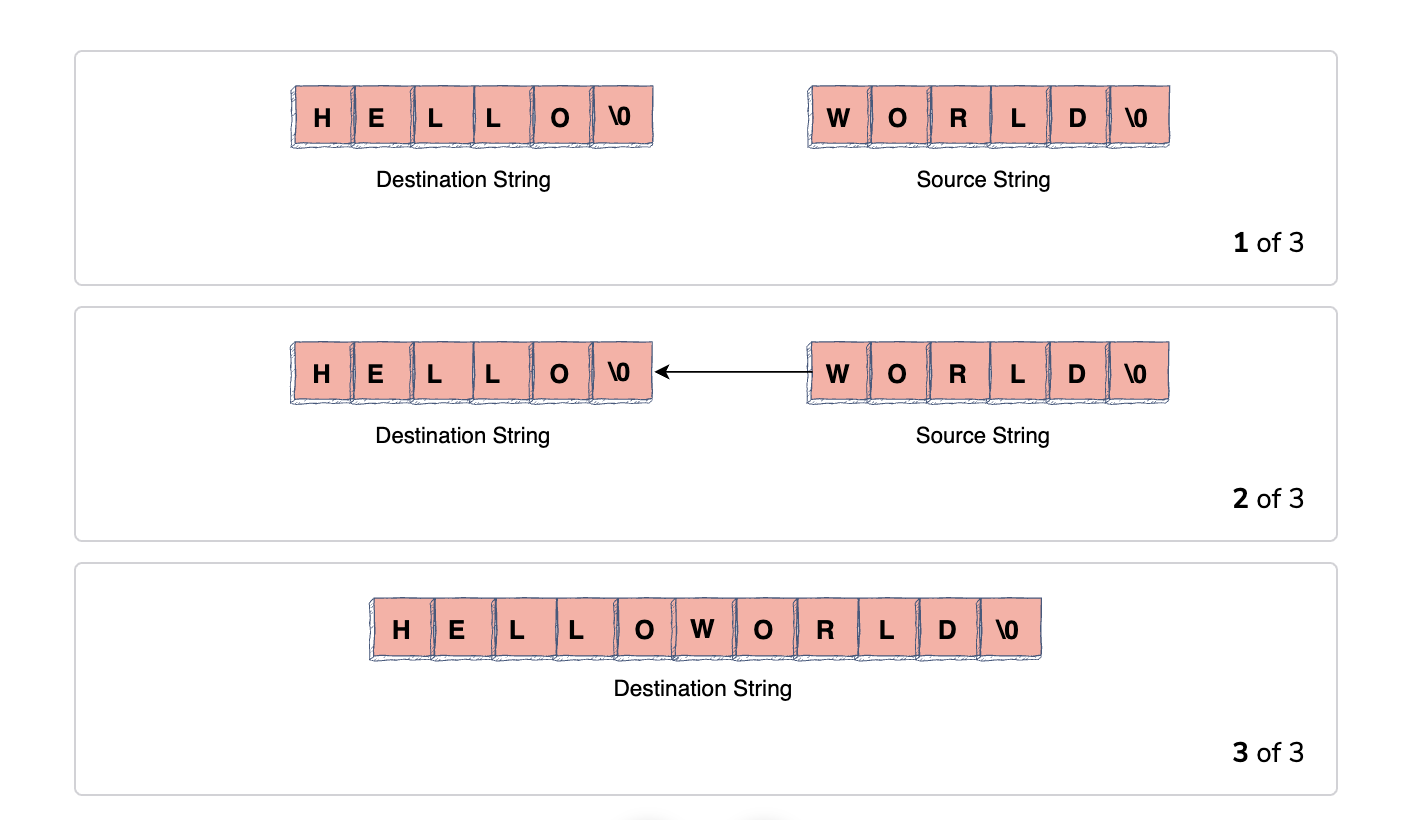
In C, the strcat() function is used to concatenate two strings. It concatenates one string (the source) to the end of another string (the destination). The pointer of the source string is appended to the end of the destination string, thus concatenating both strings.
The basic process is as follows:
- Take the destination string
- Find the NULL character
- Copy the source string beginning with the NULL character of destination string
- Append a NULL character to the destination string once copied
Let’s look at an example. Below, the following code will concatenate two strings using the strcat() function:
In addition to modifying the original destination string, the strcat() function also returns a pointer to that string. This means that we can directly pass the strcat() function to the printf() function.
In C, the destination array must be initialized before passing it to strcat. This means that it must have at least 1 location with a NULL character.
strncat function for appending characters#
The strncat function is slightly different. We can use this to append at most n characters from a source string to a destination string. The example below appends the first 5 characters from src at the end of dest (i.e. starting from the NULL character). It then appends a NULL character in the end.
Note: The destination array must be large enough to hold the following: the characters of the destination, n characters of the source, and a NULL character.
If the number of characters to copy exceeds the source string, strncat will stop appending when it encounters the NULL character, like below:
Appending strings with sprintf()#
Another method for appending strings in C is to use the sprintf() function. The sprintf() function allows you to format a string and store the result. Here is an example of using the sprintf() function to append two strings:
The sprintf() function appends the string “world!” to the end of the string "Hello, ". Using pointer arithmetic and the strlen() function to find the end of the destination string, “Hello world!” is now our output.
C strings vs C++ std::string concatenation#
If you're learning C, you'll quickly notice that string handling requires careful memory management and manual buffer handling. In contrast, modern C++ provides std::string, a higher-level abstraction that automatically manages memory and makes string operations significantly easier.
Both approaches are important in systems programming, but they solve different problems. Understanding the trade-offs between C-style strings and C++ std::string helps you choose the right tool for the right environment.
The key difference between C strings and std::string#
In C, strings are simply arrays of characters ending with a null terminator ('\0').
For example:
char message[] = "Hello";
Internally, this looks like:
H e l l o \0
Functions like strcat() work directly on these character arrays. Because the language does not automatically track buffer size, programmers must manually allocate enough memory and prevent overflows themselves.
C++ takes a different approach with std::string.
std::string message = "Hello";
std::string is a class that automatically:
Manages memory allocation
Tracks string length
Resizes buffers dynamically
Handles null termination internally
This greatly reduces the chance of memory-related bugs and makes string concatenation easier to read and maintain.
Side-by-side string concatenation examples#
Let’s compare how the same concatenation task works in both languages.
Goal:
Concatenate:
"Hello, ""world!"
C-style string concatenation#
#include <stdio.h>#include <string.h>int main() {char greeting[20] = "Hello, ";char message[] = "world!";strcat(greeting, message);printf("%s\n", greeting);return 0;}
Output#
Hello, world!
What happens here?#
The greeting array is manually allocated with 20 bytes:
char greeting[20]
This extra space is necessary because strcat() appends characters directly into the existing buffer.
The function:
Finds the null terminator in
"Hello, "Starts copying characters from
"world!"Appends a new null terminator
If the destination array were too small, the program could overflow memory and produce undefined behavior.
C++ std::string concatenation#
#include <iostream>#include <string>int main() {std::string greeting = "Hello, ";std::string message = "world!";std::string result = greeting + message;std::cout << result << std::endl;return 0;}
Output#
Hello, world!
What happens here?#
The std::string class automatically:
Allocates memory
Expands storage when needed
Tracks string length internally
When using:
greeting + message
C++ creates a new string object containing the combined result.
Unlike C, there is no need to:
Manually calculate buffer sizes
Add null terminators
Worry about buffer overflows during normal usage
This makes the code significantly easier to write and maintain.
Understanding the trade-offs#
The biggest difference between the two approaches is control versus convenience.
C-style strings prioritize low-level control#
C gives programmers direct access to memory. This makes it:
Extremely fast
Lightweight
Predictable
However, that flexibility comes with responsibility. You must manually:
Allocate memory
Track buffer sizes
Prevent overflows
Handle null termination
This is powerful, but also error-prone.
std::string prioritizes safety and usability#
C++ abstracts most of the low-level memory handling away from the programmer.
This improves:
Readability
Maintainability
Development speed
Memory safety
The trade-off is that std::string introduces:
Slightly more overhead
Automatic memory allocations
Less direct memory control
For most applications, this trade-off is worthwhile because safer code is usually easier to maintain.
Comparison table#
Feature | C-style strings | C++ std::string |
Memory management | Manual | Automatic |
Safety | Lower | Higher |
Ease of use | More complex | Beginner-friendly |
Performance control | Very high | Moderate to high |
Buffer overflow risk | High if unmanaged | Much lower |
Dynamic resizing | No | Yes |
Readability | Less readable | More readable |
Typical use cases | Embedded systems, OS kernels, low-level programming | General applications, modern C++ development |
When should you use each?#
Choosing between C strings and std::string depends on your environment, performance requirements, and safety needs.
Use C strings when you need low-level control#
C-style strings are still common in:
Embedded systems
Operating systems
Device drivers
Real-time systems
Memory-constrained environments
In these cases, developers often need precise control over:
Memory layout
Allocation behavior
Performance overhead
C strings are also important when interacting directly with hardware or legacy C APIs.
Use std::string for most modern C++ applications#
For general software development, std::string is usually the better choice.
It improves:
Code safety
Development speed
Maintainability
Readability
Modern C++ development strongly prefers std::string over raw character arrays because automatic memory management helps prevent many common programming errors.
Applications that commonly use std::string include:
Desktop applications
Backend systems
Tools and utilities
Game engines
Large-scale software projects
Interoperability between C and C++#
Even when using std::string, you can still interact with C-style APIs.
The c_str() method provides access to a null-terminated character array:
std::string message = "Hello";const char* text = message.c_str();
This is useful when:
Calling legacy C libraries
Using operating system APIs
Interfacing with low-level functions
This interoperability is one reason C++ remains highly compatible with existing C ecosystems.
Practical warning about C string handling#
C string functions like:
strcat()strcpy()sprintf()
can become dangerous if memory is not managed carefully.
Because these functions do not automatically check buffer sizes, even small mistakes can lead to:
Buffer overflows
Crashes
Corrupted memory
Security vulnerabilities
This is why defensive programming practices—and safer alternatives like snprintf()—are so important in real-world C development.
More C string questions#
There is a lot more we can do with strings in C. Take a look at some of the common interview questions about strings to get a sense of what to learn:
- Edit all the contents of a string
- Replace every character of a string with a different character
- Map every character of one string to another so all occurrences are mapped to the same character
- Initialize a string in C to an empty string
- How to preform iteration over a string in C
- Modify the string so that every character is replaced with the next character in the keyboard
- Make an array on strings using pointers
- Convert all the letters in a string to Uppercase letters
- Convert a string to an integer
- Splitting a string using
strtok()in C
Learn C Programming
Learning C programming remains one of the most valuable investments you can make as a developer. It’s the language that sits closest to the machine, powering operating systems, embedded systems, and performance-critical applications. More importantly, it shapes how you understand memory, execution, and the fundamentals behind modern programming languages. I designed this roadmap after seeing how differently people approach learning C programming. Some jump straight into syntax, others get stuck on pointers, and many never connect the pieces into a cohesive understanding. The goal here is to give you a structured, adaptive path that meets you where you are and pushes you forward in the right direction. The roadmap adjusts based on your experience. If you’re starting fresh, you’ll build a strong foundation in C. programming fundamentals like control flow, functions, and problem-solving. If you already know the basics, you’ll go deeper into memory management, pointers, and how programs interact with hardware. As you progress, you’ll work through hands-on exercises, practical challenges, and advanced topics like structs, enums, and performance-focused programming. By the end, you’ll understand how software really works under the hood, and that perspective will carry over into every language and system you work with.
What to learn next#
Congrats! You should now have a solid idea of how to concatenate two strings in C. It’s a simple process that is important to know for building your foundation. A good next step for your C journey is to learn some advanced C programming concepts like:
- Pointers and arrays
- I/O streams
- Algorithms in C
- Data structures in C
- Debugging in C
- Advanced string modification
To help you with your journey, Educative offers a free course called Learn C. This comprehensive and detailed course will introduce you to all the basic and advanced programming concepts of C language.
You’ll learn everything from data types, control flow, functions, input/output, memory, compilation, debugging, and much more.
To continue with C after the basics, try out our Become a C Programmer complete skill path to continue your learning with these advanced C concepts.
Happy learning!
Continue reading about C and strings#
Frequently Asked Questions
How to concatenate a string to itself in C?
How to concatenate a string to itself in C?
Written By:
Amanda Fawcett
Related Courses
C++ Brain Teasers: Exercise Your MindGrokking the Coding Interview Patterns in C#Grokking the Coding Interview Patterns in JavaScriptGrokking the Coding Interview Patterns in GoGrokking the Coding Interview PatternsGrokking the Coding Interview Patterns in C++Grokking the Coding Interview Patterns in PythonUsing Laravel for Advanced String Manipulation in PHPLearn ScalaAdvanced Programming Techniques in CLearn Data Structures and Algorithms in C#Learn Data Structures and Algorithms in GoLearn Data Structures and Algorithms in JavaLearn Data Structures and Algorithms in JavaScriptLearn Data Structures and Algorithms
