What is image compression: 2026 guide
Understand image compression from theory to real-world use. Learn how JPEG works, compare modern formats like WebP and AVIF, explore trade-offs, and apply compression techniques in scalable systems and performance-focused applications.
A digital image is a discrete signal represented as a matrix of pixel values, and image compression reduces the storage and transmission cost of these images by exploiting data redundancies or discarding perceptually less important information. Techniques range from lossless methods like Huffman and run-length coding to lossy approaches such as transform coding used in the JPEG standard, with modern formats like WebP and AVIF pushing efficiency even further.
Key takeaways
Lossless vs. lossy compression: Lossless methods preserve all original data through redundancy exploitation, while lossy methods drop less critical information after transforming data into the frequency domain via techniques like DCT or wavelet transforms.
JPEG codec pipeline: JPEG divides an image into 8×8 pixel blocks, converts RGB to YCbCr color space, applies chroma subsampling and DCT-based transform coding, then finishes with run-length and entropy encoding.
Rate-distortion tradeoff: Compression balances bitrate against perceived quality, and metrics like SSIM, MS-SSIM, and VMAF correlate with human perception far better than basic PSNR.
Modern formats beyond JPEG: WebP offers 25–35% size reduction over JPEG at similar quality, while AVIF (based on the AV1 video codec) delivers even greater savings, especially for HDR and wide color gamut content.
Compression artifacts and mitigation: Heavy compression produces block discontinuities, ringing around edges, and quantization noise, which newer codecs like HEVC and AV1 address through in-loop deblocking filters and adaptive per-block quantization.
Introduction to Digital Images#
This blog discusses digital images and some compression techniques to represent them efficiently. We may create images by graphical methods or by capturing a natural image, so an image can be synthetic or natural. A natural image captured with a camera's help can be analog or digital. A digital image is a discrete signal that can be imagined as a matrix of values. These values are called samples, and different cameras can capture different amounts of samples per unit of space. Images like these captured by digital cameras are called raster images, and the values that represent these images are collectively called spatial data.
A single value of spatial data in a digital image is called a pixel. The memory required to represent a pixel normally classifies the images into black-and-white, grayscale, or color images. The black-and-white images require only one bit per pixel, which means in one byte, we can store eight pixels, whereas the grayscale images normally use one byte (8 bits) to store one pixel. In color images, three bytes are usually used to represent a pixel. Since there are three primary colors, one byte for each is used to describe a mix of three primary colors for one pixel.


Motivation and benefits of compression#
First, let's ask whether we really need to compress images, especially when digital memory is getting cheaper and cheaper. If we have a 48-megapixel camera on a mobile phone to capture an image, how much storage space would it require?

Let's say we want to share this image with a friend on WhatsApp. How much time would it take? We have an internet connection with an upload speed of five Mbps. Assuming a good quality of service, let’s calculate the required time.

Increasing the upload speed to double still keeps the time it takes to send the image in minutes, which is quite high. There is an obvious need for compression here, and it can benefit us in the following three ways:
It can reduce communication time.
It can reduce the cost of communication.
It can reduce the required storage space.
Let's now look at the types of image compression.
Types of compression#
There are mainly two types of compression techniques—lossless and lossy.
Lossless compression#
The lossless image compression techniques include the methods to represent an image in a compact and efficient way without losing any information present in the original image. Examples of such algorithms include Huffman, arithmetic, differential, run-length, and dictionary-based coding techniques. The main idea is to exploit different redundancies in the data that provide the margin for a compact representation.
Lossy compression#
The lossy image compression techniques essentially lose some information with an acceptable compromise on image quality. An important part of techniques like these is to segregate the parts of the information that are highly useful or critical to represent the image from the parts that are less useful. The critical part of the information depends on the context and use of the image. For example, in a selfie, the part of the information which is not important for the human visual system is not critical, but in an X-ray image that needs to be fed to software for analysis, there is no unimportant information. In an application in which the license plates of the vehicles are captured, the characters and numerals on the plate are critical. A lossy image compression method normally consists of two steps. The image data is transformed into the frequency domain in the first step. The purpose of this transformation is to decorrelate the image data. Part of the information is dropped as a second step to get a compact data representation. Discrete cosine, Walsh-Hadamard, or Karhunen–Loève transforms are used for the first step. In the second step, some kind of quantization technique is performed. This two-step process is also called transform coding.
The digital image compression process#
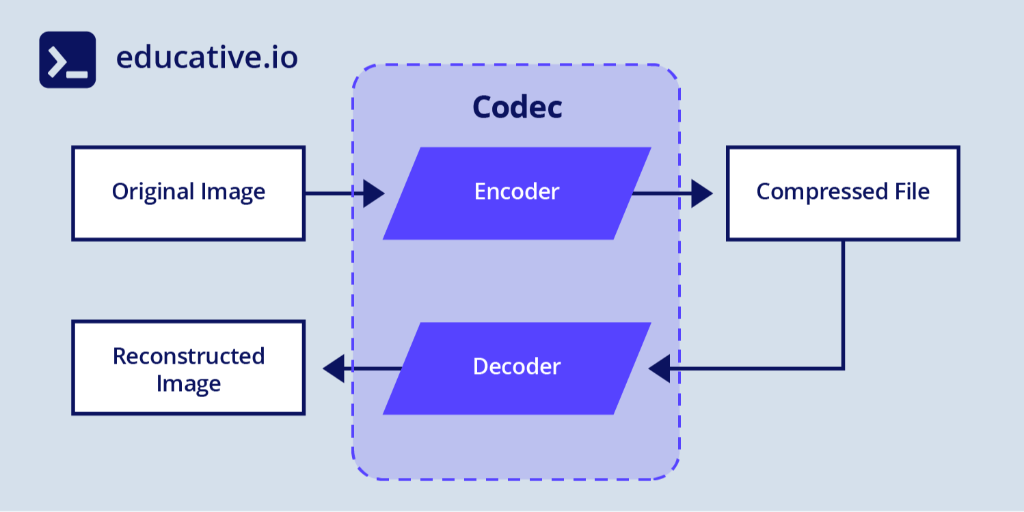
There are two main parts of the image compression process. The first part is to compress a raw image, producing a compressed file. This is called the encoding process, and the piece of software that accomplishes this task is called an encoder. The second part of the process is to take a compressed image file and produce the image in an uncompressed format, referred to as a reconstructed image. This part of the process is called decoding, and the piece of software that performs this task is called a decoder. The software that includes both an encoder and a corresponding decoder is called a codec, short for coding plus decoding.


Rate-distortion tradeoff & perceptual metrics#
Compression is fundamentally a tradeoff between bitrate (rate) and image quality (distortion). The goal of digital image compression is to place bits where they reduce perceived distortion the most.
Rate-distortion curves: plot quality metric vs file size; aim for “knee” points.
Metrics:
PSNR (Peak Signal-to-Noise Ratio): basic, but doesn’t correlate well with perceived quality for heavy compression.
SSIM / MS-SSIM: Structural Similarity Measures better visual fidelity.
Perceptual metrics: VMAF, Butteraugli, etc.
Perceptual quantization & weighting: leverage properties of Human Visual System–e.g., errors in textured or high-frequency areas are less visible.
Mention this to deepen the theoretical side of digital image compression beyond algorithm steps.
The need for standardization#
The different compression techniques mentioned above can be combined to design a codec. If we design our own codec, compress images with it, and share those images with different people, we have to provide the decoder to all the people involved so that they can decompress the files compressed by our encoder. Since there are different compression algorithms, we can design too many different codecs with the combination of these algorithms. This crisis gives rise to the need for standardization of the codec. That means the sequence of algorithms, variations of the parameters to these algorithms, and, most importantly, the format of the bits in the compressed files need to be standardized. The standardization provides us the advantage of interoperability and the provision of specialized hardware to achieve enhanced performance.
The JPEG standard has been widely accepted since its creation in 1992 for natural images containing raster data. It's the first choice for digital photography. The acronym JPEG stands for Joint Photographic Experts Group, the team that made this standard. This team consists of two subgroups—one from International Organization for Standardization (ISO) and one from the International Telecommunication Union Telecommunication Standardization Sector (ITU-T).
Famous standard image formats#
The image files compressed with JPEG can have a .jpg, .jpeg, .jfif, or .pjpeg extension. The following table summarizes basic information regarding different image file types.
File Format | File Extension | Compression Techniques |
JPEG | .jpg, .jpeg, .jfif, .pjpeg | Lossless and lossy methods |
GIF | .gif | Lossless methods |
PNG | .png | Lossless methods |
BMP | .bmp | Lossless methods |
In the JPEG standard, chroma subsampling and transform coding are lossy, while lossless methods include run-length encoding and entropy coding. The other standards mentioned in the table use Lempel–Ziv–Welch (LZW), a dictionary-based, lossless encoding method, alone or in combination with entropy coding methods.
Modern image formats & codecs: WebP, AVIF, HEIF#
While JPEG is still ubiquitous, newer digital image compression formats significantly improve the quality-to-size ratio.
WebP (by Google) supports both lossy and lossless. For many images, WebP can reduce size ~25–35% compared to JPEG at similar visual quality. WebP also supports alpha transparency (PNG replacement).
AVIF/HEIC (HEIF): Based on the AV1/HEVC video codecs, AVIF offers even better compression (especially for HDR or wide color gamut images). It can outperform JPEG substantially at the same perceptual quality.
JPEG2000: Uses wavelet transforms instead of DCT, supports progressive decoding, and regions of interest.
PNG optimizations: For lossless imagery, combining filtering, DEFLATE tuning, and palette strategies (for low-color images) matters.
Use-case tip: When browser support allows, use WebP or AVIF for web delivery; fallback to JPEG for compatibility.
This section helps readers see that digital image compression is evolving beyond the JPEG just described.
How to choose the right image format in real-world applications#
Understanding compression techniques is important, but in practice, developers are often faced with a simpler question: which format should I use?
The answer depends on your use case.
If you’re working with photographs and need a balance between quality and size, JPEG remains a reliable choice. However, newer formats like WebP and AVIF offer significantly better compression at similar visual quality, making them ideal for modern web applications.
For images that require transparency or exact reproduction, such as logos, icons, or UI elements, PNG is a better option because it uses lossless compression.
GIF is mostly limited to simple animations and low-color images, while AVIF is becoming increasingly popular for high-efficiency compression, especially for HDR and wide color gamut content.
In production systems, a common strategy is to serve AVIF or WebP where supported, and fall back to JPEG or PNG for compatibility. This approach ensures optimal performance without sacrificing accessibility.
The JPEG standard codec#
The JPEG codec is also referred to as the block-based image coding. This is because it divides the image into blocks of


In the block diagram shown above, each block deserves a separate blog post to learn the full details of how each works. The purpose of this blog post was to give an abstract, global view. To start programming your own custom image codec in Python, you might want to start with the following hands-on projects:
Artifact Mitigation & Deblocking Strategies#
When images are highly compressed, artifacts appear. A robust digital image compression design anticipates them:
Block artifacts: sharp discontinuities at 8×8 boundaries.
Ringing / Gibbs artifacts: overshoot around edges.
Quantization noise: visible grain in flat regions.
Deblocking/post filters: Many codecs embed filters (e.g., transform-domain smoothing and bilateral filters) to reduce visible blocking while preserving edges.
In-loop filtering/adaptive quantization: newer codecs (HEVC, AV1) adjust quantization per block and include in-loop filters to suppress artifacts. Mentioning this shows awareness of real-world compression challenges.
How image compression is used in real-world systems#
Image compression is not just about saving space; it plays a critical role in large-scale systems.
For example, social media platforms like Instagram and Facebook compress images aggressively before storing and delivering them. This reduces storage costs and ensures fast loading times for users across different network conditions.
Streaming platforms and content delivery networks use compression alongside caching and CDNs to minimize latency and bandwidth usage. Without compression, serving millions of images per second would be prohibitively expensive.
In mobile applications, compression directly impacts user experience. Smaller images mean faster load times, reduced data usage, and better performance on slower networks.
Understanding these real-world applications helps you connect compression theory with System Design decisions, something that is highly valued in interviews and production environments.
Build a simple image compression pipeline in Python#
To truly understand image compression, it helps to experiment with it directly.
A simple starting point is building a basic compression pipeline in Python. You can load an image, convert it into a matrix of pixel values, and apply a simple transformation such as reducing color depth or performing basic subsampling.
For example, you can simulate lossy compression by reducing the number of colors in an image or applying a basic discrete cosine transform (DCT) to observe how frequency components affect quality.
You can then compare file sizes and visually inspect the output to understand how compression impacts image quality.
This hands-on exercise makes abstract concepts like transform coding and quantization much more intuitive and helps you develop a deeper understanding of how real codecs work.
How image compression is discussed in System Design interviews#
Image compression is a common topic in System Design interviews, especially for roles involving large-scale systems.
You might be asked how a platform like Instagram handles image uploads. A strong answer would include compressing images on upload, storing multiple resolutions, and serving optimized formats through a CDN.
You could also discuss trade-offs between storage cost and image quality, as well as strategies like lazy loading and adaptive image delivery.
In these discussions, the goal is not to explain the math behind compression, but to demonstrate how it fits into a scalable architecture.
Connecting compression techniques to system design shows that you understand both theory and practical application.
Wrapping up: from compression theory to real-world impact#
Image compression sits at the intersection of mathematics, perception, and system design. In this guide, you explored how digital images are represented, why compression is necessary, and how techniques like transform coding, quantization, and entropy encoding work together to reduce file size.
You also saw how widely used standards like JPEG rely on block-based processing and frequency-domain transformations to balance storage efficiency with acceptable visual quality. More importantly, you explored how modern formats like WebP and AVIF continue to push the boundaries of compression efficiency by leveraging advances in codec design.
What makes image compression particularly powerful is that it’s not just an academic concept. It directly impacts performance, scalability, and user experience in real systems. Whether you’re building a web application, designing a mobile app, or working on large-scale platforms, the choices you make around compression affect load times, bandwidth usage, and infrastructure costs.
By connecting these concepts to practical use cases, you move beyond understanding how compression works to understanding why it matters.
