

One hot encoding is a powerful technique for handling categorical data, but it can also increase dimensionality, sparsity, and the risk of overfitting.
Table of Contents
Data Science in 5 Minutes: What is One Hot Encoding?
Learn what one-hot encoding is, when to use it, how it compares to other encoding techniques, and how to implement it with Pandas and Scikit-learn to prepare categorical data for machine learning models.
15 mins read
Jun 01, 2026
Share

If you’re in the field of data science, you’ve probably heard the term “one hot encoding”. Even the Sklearn documentation tells you to “encode categorical integer features using a one-hot scheme”. But, what is one hot encoding, and why do we use it?
Most machine learning tutorials and tools require you to prepare data before it can be fit to a particular ML model. One hot encoding is a process of converting categorical data variables so they can be provided to machine learning algorithms to improve predictions. One hot encoding is a crucial part of feature engineering for machine learning.
In this guide, we will introduce you to one hot encoding and show you when to use it in your ML models. We’ll provide some real-world examples with Sklearn and Pandas.
This tutorial at a glance:
- What is one hot encoding?
- How to convert categorical data to numerical data
- One hot encoding with Pandas
- One hot encoding with Sklearn
- Next steps for your learning
Start mastering feature engineering for ML with our hands-on course today.
Feature Engineering for Machine Learning
Feature engineering is a crucial stage in any machine learning project. It allows you to use data to define features that enable machine learning algorithms to work properly. In this course, you will learn the techniques that will help you create new features from existing features. You’ll start by diving into label encoding which is crucial for converting categorical features into numerical. You’ll also learn about other various types of encoding such as: one-hot, count, and mean, all of which are important for feature engineering. In the remaining chapters, you’ll learn about feature interaction and datetime features. In all, this course will show you the many different ways you can create features from existing ones.
What is one hot encoding?#
Categorical data refers to variables that are made up of label values, for example, a “color” variable could have the values “red,” “blue,” and “green.” Think of values like different categories that sometimes have a natural ordering to them.
Some machine learning algorithms can work directly with categorical data depending on implementation, such as a decision tree, but most require any inputs or outputs variables to be a number, or numeric in value. This means that any categorical data must be mapped to integers.
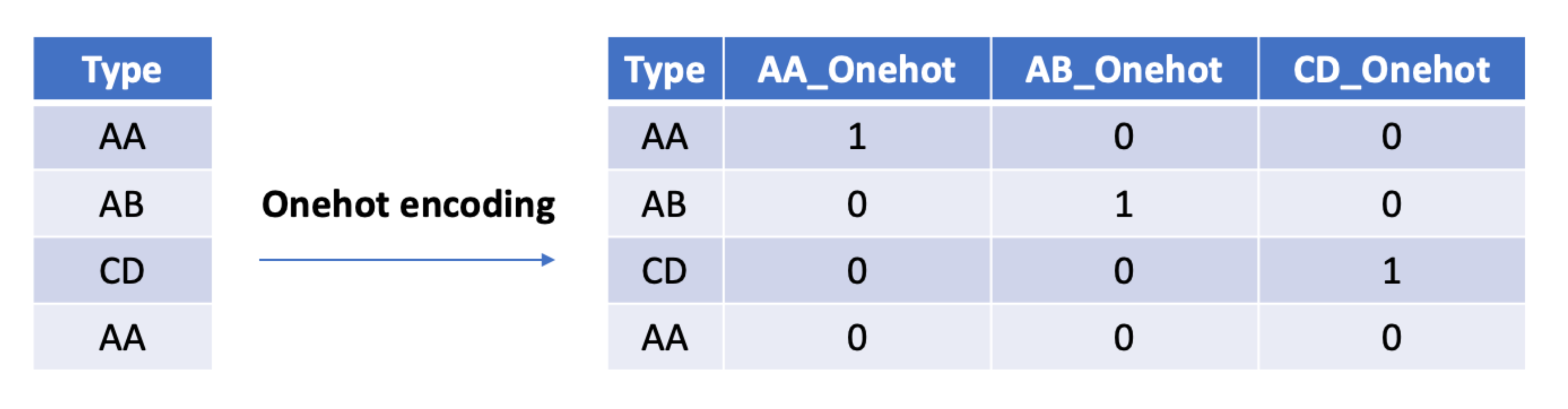
One hot encoding is one method of converting data to prepare it for an algorithm and get a better prediction. With one-hot, we convert each categorical value into a new categorical column and assign a binary value of 1 or 0 to those columns. Each integer value is represented as a binary vector. All the values are zero, and the index is marked with a 1.
Take a look at this chart for a better understanding:
Let’s apply this to an example. Say we have the values red and blue. With one-hot, we would assign red with a numeric value of 0 and blue with a numeric value of 1.
It’s crucial to be consistent when we use these values. This makes it possible to invert our encoding at a later point to get our original categorical back.
Once we assign numeric values, we create a binary vector that represents our numerical values. In this case, our vector will have 2 as its length since we have 2 values. Thus, the red value can be represented with the binary vector [1,0], and the blue value will be represented as [0,1].
Why use one hot encoding?#
One hot encoding is useful for data that has no relationship to each other. Machine learning algorithms treat the order of numbers as an attribute of significance. In other words, they will read a higher number as better or more important than a lower number.
While this is helpful for some ordinal situations, some input data does not have any ranking for category values, and this can lead to issues with predictions and poor performance. That’s when one hot encoding saves the day.
One hot encoding makes our training data more useful and expressive, and it can be rescaled easily. By using numeric values, we more easily determine a probability for our values. In particular, one hot encoding is used for our output values, since it provides more nuanced predictions than single labels.
How to read this decision tree#
Use one-hot encoding when your categories are nominal, unordered, and have a small number of unique values, such as
red,blue, andgreen.Use ordinal encoding when the categories have a meaningful order, such as
low,medium, andhigh.Use label encoding carefully. It can work well with tree-based models, but for unordered categories, it may accidentally imply an order that does not exist.
Use target encoding when you have high-cardinality features, such as ZIP codes, product IDs, or user segments. It can reduce dimensionality, but you should apply it carefully to avoid data leakage.
The encoding choice is a feature engineering decision, and it can directly affect model accuracy.
Handling high-cardinality categorical features#
One-hot encoding works well when a feature has only a few categories. But in real-world machine learning systems, you’ll often encounter features with hundreds or even thousands of unique values. This is called high cardinality, and it can create serious performance and scalability problems if you’re not careful.
What does “high cardinality” mean?#
A categorical feature has high cardinality when it contains many unique categories—typically more than 50 or 100.
Common examples include:
Product IDs in e-commerce systems
City or ZIP code features
User IDs
Search queries or keywords
For example:
Feature: CityUnique values: 1,000 citiesOne-hot encoding result:→ 1,000 binary columns
That’s where problems start.
Why one-hot encoding becomes problematic#
With high-cardinality features, one-hot encoding can quickly become inefficient.
Here’s why:
It creates too many columns
Memory usage increases significantly
Most values become
0, creating sparse matricesTraining becomes slower
Some models struggle with extremely wide datasets
It can reduce generalization and hurt performance
For small datasets, this might be manageable. For production-scale ML systems, it often isn’t.
Small vs large category example#
A small categorical feature works well with one-hot encoding:
# 3 categoriesColor = ["Red", "Blue", "Green"]# One-hot encoded resultRed Blue Green1 0 00 1 00 0 1
Now imagine a feature with 1,000 product IDs:
# 1,000 unique productsProduct_ID = ["P101", "P102", ..., "P1000"]# One-hot encoding would create:Product_P101Product_P102...Product_P1000
That means 1,000 separate columns for just one feature.
Better alternatives for high-cardinality features#
Instead of blindly applying one-hot encoding, you can use more scalable encoding techniques.
Target encoding#
Target encoding replaces each category with the average target value associated with it.
Example:
City A → average purchase value = 120
City B → average purchase value = 85
This works especially well for:
Tree-based models
Large tabular datasets
Kaggle-style ML problems
Warning: If done incorrectly, target encoding can cause data leakage because it uses information from the target variable.
Frequency/count encoding#
This technique replaces categories with how often they appear.
Example:
“New York” → 12,500
“Chicago” → 8,200
Useful when:
Category frequency itself carries meaning
You want a simple and lightweight solution
Hash encoding#
Hash encoding maps categories into a fixed number of columns using a hash function.
Benefits:
Controls feature size
Works well for very large datasets
Useful in streaming systems and NLP pipelines
Trade-off:
Different categories can occasionally collide into the same bucket
Embedding layers#
Deep learning models often use embeddings instead of one-hot encoding.
Instead of creating thousands of sparse columns, embeddings learn dense numerical representations for categories.
Common use cases:
Recommendation systems
NLP models
Large-scale deep learning pipelines
This is how systems like YouTube, Netflix, and modern language models handle massive categorical spaces efficiently.
When should you use each approach?#
One-hot encoding → Small category sets
Target encoding → Tree-based models and tabular ML
Frequency encoding → Lightweight preprocessing
Hash encoding → Extremely large feature spaces
Embeddings → Deep learning and recommendation systems
Practical recommendation#
In practice, there’s no single “best” encoding strategy.
A good rule of thumb is:
Use one-hot encoding for low-cardinality features
Use alternative encodings when category counts become large
Always validate performance using cross-validation
The right encoding strategy can significantly improve both model scalability and feature engineering quality.
Sparse matrices and memory efficiency#
One-hot encoding is simple and powerful, but it comes with a hidden cost: memory usage. As the number of categories grows, the encoded dataset can become extremely large because most values in the matrix are zeros. That’s where sparse matrices become important.
Why one-hot encoding wastes memory#
When you one-hot encode categorical features, each category becomes its own binary column.
For example:
Color = ["Red", "Blue", "Green"]One-hot encoded:Red Blue Green1 0 00 1 00 0 1
This works fine for small category sets. But imagine a feature with 10,000 unique product IDs.
You would create:
10,000 columns
Mostly zeros in every row
A very large dense matrix
That means you’re storing huge amounts of unnecessary data.
What is a sparse matrix?#
A sparse matrix stores only the non-zero values instead of storing every single 0.
Conceptually:
Dense representation:[0, 0, 0, 1, 0, 0]Sparse representation:(index=3, value=1)
This is much more memory efficient because the matrix avoids storing thousands or millions of zeros.
Many machine learning libraries automatically use sparse representations internally for this reason.
How Sklearn handles sparse output#
OneHotEncoder in Scikit-learn returns sparse matrices by default.
Modern versions use:
sparse_output=True
Older versions used:
sparse=True
The output is usually a CSR matrix (Compressed Sparse Row matrix), which is optimized for efficient storage and fast operations.
Dense vs sparse intuition#
A small feature with 10 categories is usually manageable with dense storage.
But with:
10,000 categories
Millions of rows
Multiple encoded features
…the dense representation can consume massive amounts of memory very quickly.
Sparse matrices solve this by storing only the meaningful values.
Example 1: Dense output with Pandas#
import pandas as pddf = pd.DataFrame({"city": ["Lahore", "Karachi", "Islamabad", "Lahore"]})dense_encoded = pd.get_dummies(df["city"])print(dense_encoded)print("\nShape:", dense_encoded.shape)print("Type:", type(dense_encoded))
Output type#
<class 'pandas.core.frame.DataFrame'>
This creates a normal dense DataFrame where all values—including zeros—are stored in memory.
Example 2: Sparse output with Sklearn#
from sklearn.preprocessing import OneHotEncoderimport pandas as pddf = pd.DataFrame({"city": ["Lahore", "Karachi", "Islamabad", "Lahore"]})encoder = OneHotEncoder(sparse_output=True)sparse_encoded = encoder.fit_transform(df[["city"]])print("Shape:", sparse_encoded.shape)print("Type:", type(sparse_encoded))
Output type#
<class 'scipy.sparse._csr.csr_matrix'>
Instead of storing every zero explicitly, the matrix stores only the positions of non-zero values.
Optional memory comparison#
import sysdense_size = sys.getsizeof(dense_encoded)sparse_size = sys.getsizeof(sparse_encoded)print("Dense size:", dense_size)print("Sparse size:", sparse_size)
On larger datasets, the memory difference becomes dramatic.
When should you care?#
Large datasets
NLP systems (bag-of-words, TF-IDF)
Recommendation systems
High-cardinality categorical features
Production ML pipelines
Some machine learning algorithms also work better with sparse input than others, especially linear models and certain tree-based approaches.
Practical recommendation#
Use sparse matrices whenever your feature dimensionality becomes large. They improve both memory efficiency and scalability, which becomes critical in real-world machine learning systems.
How to convert categorical data to numerical data#
Manually converting our data to numerical values includes two basic steps:
- Integer encoding
- One hot encoding
For the first step, we need to assign each category value with an integer, or numeric, value. If we had the values red, yellow, and blue, we could assign them 1, 2, and 3 respectively.
When dealing with categorical variables that have no order or relationship, we need to take this one step further. Step two involves applying one-hot encoding to the integers we just assigned. To do this, we remove the integer encoded variable and add a binary variable for each unique variable.
Above, we had three categories, or colors, so we use three binary variables. We place the value 1 as the binary variable for each color and the value 0 for the other two colors.
red,	yellow,	 blue
1,		0,		0
0,		1,		0
0,		0,		1
Note: In many other fields, binary variables are referred to as dummy variables.
Start mastering feature engineering for ML with our hands-on course today.
Feature Engineering for Machine Learning
Feature engineering is a crucial stage in any machine learning project. It allows you to use data to define features that enable machine learning algorithms to work properly. In this course, you will learn the techniques that will help you create new features from existing features. You’ll start by diving into label encoding which is crucial for converting categorical features into numerical. You’ll also learn about other various types of encoding such as: one-hot, count, and mean, all of which are important for feature engineering. In the remaining chapters, you’ll learn about feature interaction and datetime features. In all, this course will show you the many different ways you can create features from existing ones.
What is the dummy variable trap?#
One-hot encoding is a powerful technique, but it can sometimes introduce an issue known as the dummy variable trap. This occurs when all encoded categories are included in a model, creating perfect multicollinearity because one category can always be inferred from the others.
Category | Red | Blue | Green |
Red | 1 | 0 | 0 |
Blue | 0 | 1 | 0 |
Green | 0 | 0 | 1 |
In the example above, knowing the values of two columns automatically reveals the value of the third. For linear regression models, this redundancy can make coefficient estimation unstable and harder to interpret.
To avoid this issue, many machine learning practitioners drop one encoded column and treat it as the baseline category. Libraries such as Pandas and Scikit-learn provide options to automate this behavior. For example, pd.get_dummies(drop_first=True) or OneHotEncoder(drop='first') can remove the redundant feature automatically.
It's important to note that the dummy variable trap primarily affects linear models. Tree-based algorithms such as Random Forests and Gradient Boosting are generally unaffected because they do not rely on matrix inversion when learning relationships.
One hot encoding with Pandas#
We don’t have to one hot encode manually. Many data science tools offer easy ways to encode your data. The Python library Pandas provides a function called get_dummies to enable one-hot encoding.
df_new = pd.get_dummies(df, columns=["col1"], prefix="Planet")
Let’s see this in action.
- Line 7 shows that we’re using
get_dummiesto do one-hot encoding for apandas DataFrameobject. The parameterprefixindicates the prefix of the new column name. - Line 9 shows us our output.
Let’s apply this to a practical example. Say we have the following dataset.
import pandas as pd

ids = [11, 22, 33, 44, 55, 66, 77]
countries = ['Seattle', 'London', 'Lahore', 'Berlin', 'Abuja']

df = pd.DataFrame(list(zip(ids, countries)),
                  columns=['Ids', 'Cities'])
Here we have a Pandas dataframe called df with two lists: ids and Cities. Let’s call the head() to get this result:
| Ids | Cities | |
|---|---|---|
| 0 | 11 | Seattle |
| 1 | 22 | London |
| 2 | 33 | Lahore |
| 3 | 44 | Berlin |
| 4 | 55 | Abuja |
We see here that the Cities column contains our categorical values: the names of our cities. We must convert them in our new column Cities using the get_dummies() function we discussed above.
y = pd.get_dummies(df.Countries, prefix='City')
print(y.head())
Here, we are passing the value City for the prefix attribute of the method get_dummies(). If we run the code now, we will print our encoded values:
- We use
LabelEncoderto convert the string to int on line 7 and line 8. - Line 9 creates our
OneHotEncoderobject. - Line 10 fits the original feature using
fit(). - Line 11 converts the original feature to the new feature using one-hot encoding.
- You can see the new data from the output of line 15.
Note: In the newer version of
sklearn, you don’t need to convert the string to int, asOneHotEncoderdoes this automatically.
Let’s see the OneHotEncoder class in action with another example. First, here’s how to import the class.
from sklearn.preprocessing import OneHotEncoder
Like before, we first populate our list of unique values for the encoder.
When we print this, we get the following for our now encoded values:
[[1. 0. 0. 0. 0. 0. 0. 1.][0. 1. 0. 0. 0. 1. 0. 0.][0. 0. 1. 0. 0. 0. 0. 1.][0. 0. 0. 1. 0. 0. 1. 0.][0. 0. 0. 0. 1. 1. 0. 0.]]
Comparing Pandas, Sklearn, and category_encoders#
Python gives you several ways to encode categorical variables, but they are not all meant for the same workflow. pd.get_dummies() is great for quick exploration, sklearn.OneHotEncoder is better for production ML pipelines, and category_encoders is useful when you need more advanced encoding strategies.
Tool | Best For | Pros | Limitations | Handles train/test consistency? | Pipeline-friendly? |
| Quick analysis and notebooks | Simple, readable, easy to use | Can create train/test column mismatches | Not automatically | No |
| Production ML workflows | Works with Sklearn pipelines, handles unseen categories | Slightly more setup | Yes | Yes |
| Advanced feature engineering | Supports target encoding and high-cardinality features | Requires extra library and careful validation | Yes, when fitted properly | Yes |
Example dataset#
import pandas as pddf = pd.DataFrame({"city": ["Lahore", "Karachi", "Lahore", "Islamabad"],"product_category": ["Books", "Electronics", "Books", "Clothing"],"purchase_amount": [1200, 4500, 1500, 3000]})print(df)
1. Pandas get_dummies()example#
encoded_df = pd.get_dummies(df,columns=["city", "product_category"])print(encoded_df)
This is the fastest way to one-hot encode categories in a notebook. However, if your test data contains a new city or is missing a category from training, you may need to manually align columns.
2. Sklearn OneHotEncoderexample#
from sklearn.preprocessing import OneHotEncoderX = df[["city", "product_category"]]encoder = OneHotEncoder(handle_unknown="ignore", sparse_output=False)encoded = encoder.fit_transform(X)encoded_df = pd.DataFrame(encoded,columns=encoder.get_feature_names_out())print(encoded_df)
OneHotEncoder is a better fit for machine learning workflows because you can fit it on training data and safely transform test data later. The handle_unknown="ignore" setting prevents errors when new categories appear.
3. category_encoders TargetEncoder example#
import pandas as pdfrom category_encoders import TargetEncoderX = df[["city", "product_category"]]y = df["purchase_amount"]encoder = TargetEncoder(cols=["city", "product_category"])encoded = encoder.fit_transform(X, y)print(encoded)
Target encoding replaces each category with a value based on the target variable. This can be useful for high-cardinality features like city names, product IDs, or user segments.Warning: Target encoding can cause data leakage if you apply it incorrectly. Always fit encoders on training data only and validate with cross-validation.
When should you use each?#
Use
pd.get_dummies()when you’re doing quick analysis, exploring data, or building a simple notebook example.Use
sklearn.OneHotEncoderwhen you’re building a real ML pipeline and need consistent behavior across training and test data.Use
category_encoderswhen one-hot encoding creates too many columns or when you need advanced techniques like target encoding, count encoding, or hashing.
In practice, start simple with one-hot encoding, then move to advanced encoders when your dataset or model needs it.
Next steps for your learning#
Congrats on making it to the end! You should now have a good idea what one hot encoding does and how to implement it in Python. There is still a lot to learn to master machine learning feature engineering. Your next steps are:
- One hot with Numpy
- Count encoding
- Mean encoding
- Label encoding
- Weight of evidence encoding
To get introduce to these, check out Educative’s mini course Feature Engineering for Machine Learning. You’ll learn the techniques to create new ML features from existing features. You’ll start by diving into label encoding which is crucial for converting categorical features into numerical. In the remaining chapters, you’ll learn about feature interaction and datetime features.
Happy learning!
Continue reading about artificial intelligence#
When we print this, we get the following for our now encoded values:
[[1. 0. 0. 0. 0. 0. 0. 1.][0. 1. 0. 0. 0. 1. 0. 0.][0. 0. 1. 0. 0. 0. 0. 1.][0. 0. 0. 1. 0. 0. 1. 0.][0. 0. 0. 0. 1. 1. 0. 0.]]
One-hot encoding in PyTorch and TensorFlow#
In deep learning, one-hot encoding is commonly used to represent categorical labels in a numerical format that neural networks can understand. You’ll see it frequently in classification tasks where models predict one class out of many possible categories.
Unlike traditional ML preprocessing pipelines, deep learning frameworks often perform one-hot encoding directly on tensors during training.
One-hot encoding in TensorFlow#
TensorFlow provides the tf.one_hot() function for converting integer labels into one-hot encoded tensors.
This is especially useful in:
Multi-class classification
Image classification labels
NLP token processing
TensorFlow example#
import tensorflow as tf# Integer labelslabels = [0, 2, 1]# One-hot encode with 3 classesencoded = tf.one_hot(labels, depth=3)print(encoded)print("Shape:", encoded.shape)
Output#
tf.Tensor([[1. 0. 0.][0. 0. 1.][0. 1. 0.]], shape=(3, 3), dtype=float32)
Shape explanation#
Input shape:
(3,)Output shape:
(3, 3)
Each label becomes a vector of length 3, where:
1marks the correct class0marks all other classes
For example:
Label
2→[0, 0, 1]
Common TensorFlow use cases#
Image classification
Multi-class neural networks
Token representation in NLP pipelines
Recommendation systems
One-hot encoding in PyTorch#
PyTorch provides torch.nn.functional.one_hot() for the same purpose.
The idea is identical:
Integer labels are converted into categorical vectors
Each class gets its own position in the vector
PyTorch example#
import torchimport torch.nn.functional as F# Integer labelslabels = torch.tensor([0, 2, 1])# One-hot encodingencoded = F.one_hot(labels, num_classes=3)print(encoded)print("Shape:", encoded.shape)
Output#
tensor([[1, 0, 0],[0, 0, 1],[0, 1, 0]])
Shape explanation#
Input tensor shape:
(3,)Output tensor shape:
(3, 3)
Each row represents one encoded class label.
Common PyTorch use cases#
Deep learning classifiers
Custom loss functions
NLP pipelines
Reinforcement learning models
One-hot encoding vs embeddings in deep learning#
One-hot encoding works well when the number of categories is small. But for large vocabularies or high-cardinality features, it becomes inefficient because the vectors grow very large and sparse.
That’s why modern deep learning systems often use embeddings instead.
Embeddings:
Learn dense numerical representations
Reduce dimensionality
Improve scalability and memory efficiency
This is especially important in:
NLP systems
Recommendation engines
Transformer models and modern AI architectures
Practical use cases#
You’ll commonly see one-hot encoding in:
Image classification labels (
cat,dog,car)NLP token encoding
Recommendation systems
Multi-class prediction tasks
Important warning#
One-hot encoding very large vocabularies can become memory-intensive because every category creates a new dimension. For large-scale deep learning systems, embeddings are usually the preferred solution.
Next steps for your learning#
Congrats on making it to the end! You should now have a good idea what one hot encoding does and how to implement it in Python. There is still a lot to learn to master machine learning feature engineering. Your next steps are:
- One hot with Numpy
- Count encoding
- Mean encoding
- Label encoding
- Weight of evidence encoding
To get introduce to these, check out Educative’s mini course Feature Engineering for Machine Learning. You’ll learn the techniques to create new ML features from existing features. You’ll start by diving into label encoding which is crucial for converting categorical features into numerical. In the remaining chapters, you’ll learn about feature interaction and datetime features.
Happy learning!
Continue reading about artificial intelligence#
Frequently Asked Questions
What is one hot encoding?
What is one hot encoding?
Written By:
Amanda Fawcett
Related Courses
An Introductory Guide to Data Science and Machine LearningData Science for Non-ProgrammersMastering Data Analysis with Python PandasAdvanced pandas—Going Beyond the BasicsData Science in Production: Building Scalable Model PipelinesData Science Interview HandbookLinear Algebra for Data Science Using PythonData Science in R: From Basics to Machine LearningIntroduction to Data Science with PythonLearn Data Science with Bash ShellData Science and Machine Learning Interview HandbookData Wrangling With PythonBusiness Machine LearningApplied Machine Learning: Industry Case Study with TensorFlowData Visualizations with ggplot2 in R
