What Are VPCs and Subnets?
Explore the core concepts of Virtual Private Clouds and subnets in AWS. Learn how to create a VPC with CIDR blocks, enable DNS hosting, and set up public and private subnets across availability zones to build secure and scalable network architectures.
VPCs
Now that we’ve learned the basic concepts of networking, let’s see how AWS implements it.
On AWS, we can create Virtual Private Clouds (VPCs) for our internal networks. A Virtual Private Cloud is a virtual private network in Amazon’s data centers that only you have access to. Within this VPC, all your instances and services can communicate with each other, but other AWS customers cannot see them.
VPCs always use IPv4 addresses from the three private IPv4 ranges we learned about in the last lesson. If we create a new VPC, we can specify which IPv4 address range to use by providing a CIDR block.
VPCs span across all availability zones in a region.
Note: VPCs are always free on AWS, but some additional components like gateways cost extra.
Three-tier architecture
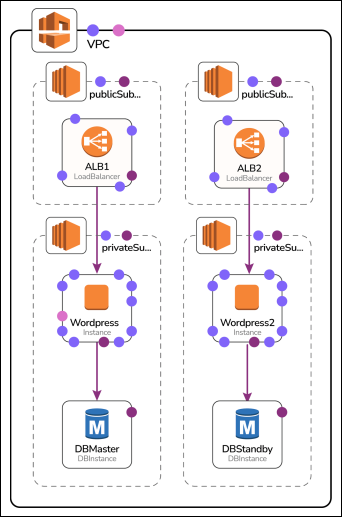
In this chapter, we’ll implement a typical three-tier-architecture using VPCs and subnets.
Each tier has a distinct function:
-
The first tier, the presentation layer, is the only publicly reachable component (our ALB load balancers) and therefore resides in a public subnet within our VPC.
-
The second tier, the logic layer, consists of our WordPress EC2 instances and is located in the private subnet.
-
The third tier, the data layer, describes our RDS databases and resides in the private subnet as well.
Building up an application in such a tiered architecture increases security because the public surface area is smaller, and each tier can only access the next one.

Hands-on: Create a new VPC
Let’s create a new VPC! The new VPC should have a large CIDR range to allow for expansion, so let’s pick 10.0.0.0/16 (the biggest allowed range for VPCs). To keep everything clean, we ...