Custom Error Messages
Explore how to create and configure custom error messages in Spring MVC applications. Understand how Spring Boot uses the messages.properties file to override default validation messages and how to handle type mismatch errors with specific, user-friendly notifications.
We can specify error messages inside the annotation like this:
@NotNull(message="This is a required field.")@Past(message="Date must be in the past.")@Min(value=1, message="Value must be greater than or equal to 1.")
These error messages override the default error messages for the constraints provided by the Hibernate validator. The Hibernate Validator is the reference implementation of the Bean Validation API. The default messages for the annotations are located in the ValidationMessages.properties file inside the hibernate-validator jar file.

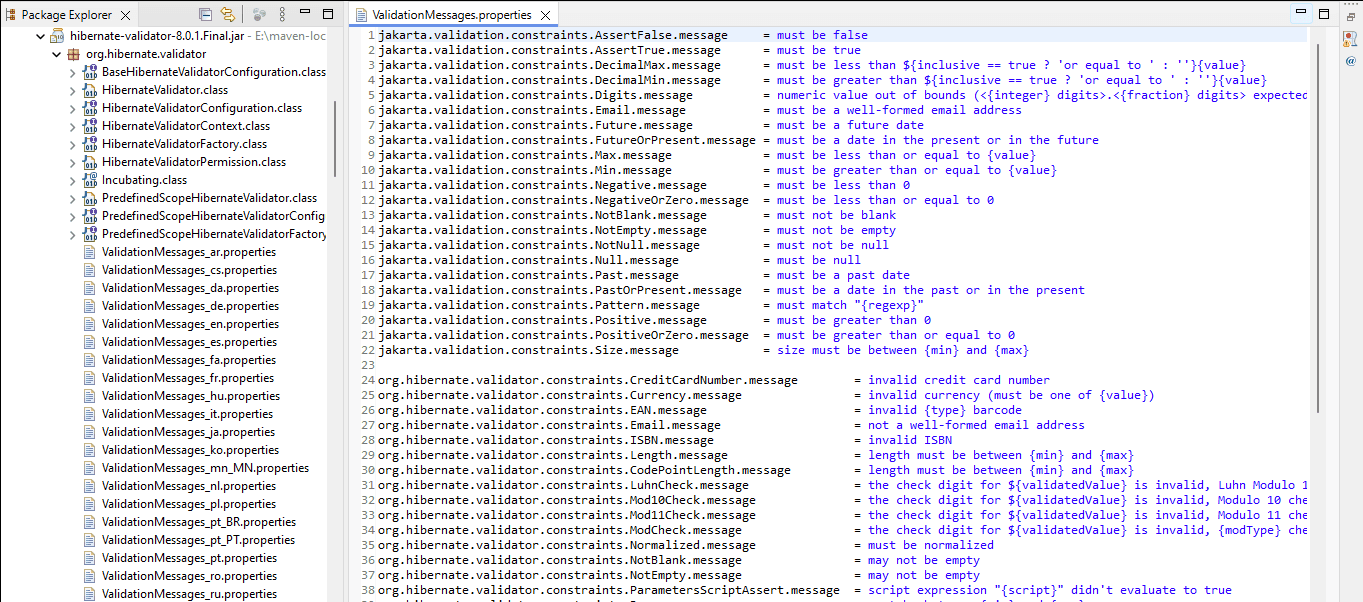
Type mismatch errors
This type of error occurs in non-String fields when data cannot be converted into the desired datatype. For example, if a String in entered in an int field.
In such a case, Spring shows a default message, which shows why the exception was thrown. We can create a custom message in messages.properties file. The properties file is placed in the WEB-INF/resources folder and is used to externalize the ...