How hard is it to learn TypeScript? A realistic guide
Thinking about learning TypeScript? Discover how difficult it really is, what challenges to expect, and how to master it step by step. Learn why many developers find TypeScript easier and more powerful over time.
Many developers who build modern web applications eventually encounter TypeScript while working with JavaScript frameworks and large frontend codebases. As they explore whether to adopt it, they often begin by asking how hard is it to learn TypeScript compared with traditional JavaScript development.
TypeScript is essentially a superset of JavaScript that introduces optional static typing along with additional tooling features designed to improve developer productivity. Because TypeScript builds directly on JavaScript, it retains all standard JavaScript functionality while adding tools that help developers write more predictable and maintainable code.
For developers already familiar with JavaScript fundamentals, the transition to TypeScript is often smoother than expected. However, the introduction of type annotations, interfaces, and other features related to the type system may initially feel unfamiliar. Understanding what TypeScript adds to JavaScript and how developers gradually learn these features helps clarify the actual learning curve.
Learn TypeScript
TypeScript has become the standard for building large, reliable applications because it catches bugs before they reach production, improves collaboration across teams, and makes complex codebases easier to understand. If you're ready to write production-quality JavaScript, this course is designed to help you make that transition with confidence. I built this course from my experience leading engineering teams and building developer tools, as well as my seven years at Microsoft. One pattern I saw repeatedly was that developers often learned TypeScript by memorizing syntax instead of understanding the type system. This course focuses on building that mental model first, so you can use TypeScript naturally rather than fighting the compiler. You'll begin with type inference and the fundamentals before progressing through interfaces, unions, generics, classes, utility types, and practical design patterns. Throughout the course, you'll reinforce each concept with interactive lessons, hands-on coding exercises, and a capstone project that mirrors the kinds of challenges you'll encounter in real production codebases. The emphasis is always on writing code that is safer, easier to maintain, and built to scale. Thousands of developers have used Educative's interactive learning platform to strengthen their programming skills and prepare for modern software engineering roles. If you want to master TypeScript and build applications with greater confidence, this course provides a practical, structured path to get there.
Understanding what TypeScript adds to JavaScript#
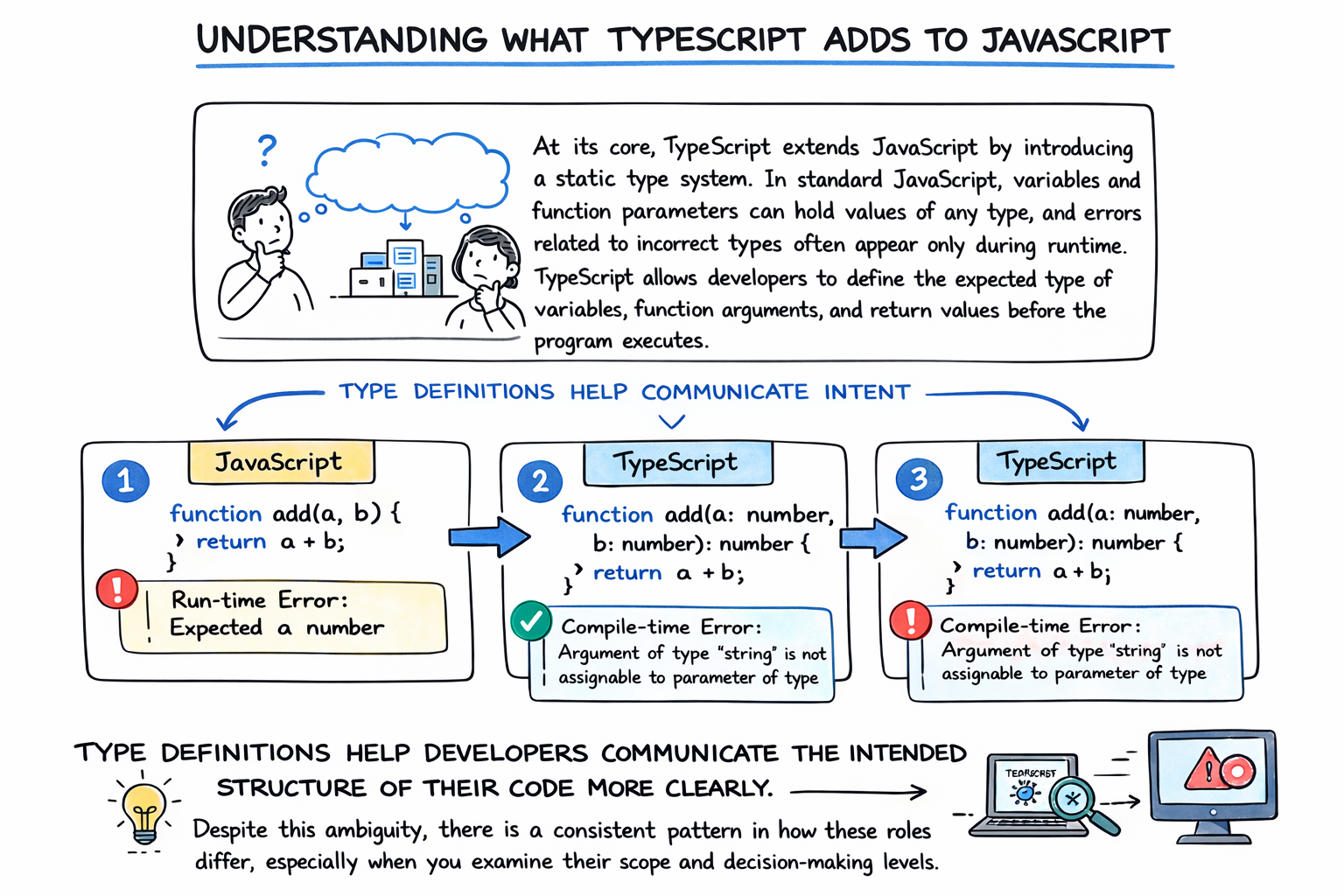
At its core, TypeScript extends JavaScript by introducing a static type system. In standard JavaScript, variables and function parameters can hold values of any type, and errors related to incorrect types often appear only during runtime. TypeScript allows developers to define the expected type of variables, function arguments, and return values before the program executes.
These type definitions help developers communicate the intended structure of their code more clearly. When the TypeScript compiler analyzes a program, it checks whether the types used in the code match the declared expectations. If a mismatch occurs, the compiler produces an error before the code runs.
Consider the following example written in JavaScript:
function add(a, b) {return a + b;}
In this version, the function accepts any type of input, which could potentially lead to unexpected behavior if strings or other values are passed.
Now consider the same function written in TypeScript:
function add(a: number, b: number): number {return a + b;}
The TypeScript version explicitly specifies that both parameters must be numbers and that the function returns a number. This additional clarity allows development tools to detect incorrect usage before the application runs.
By adding this layer of type information, learning TypeScript helps developers catch errors earlier, document code behavior more clearly, and maintain large codebases more effectively.
Using TypeScript with React
If you are a React developer and want to build your React apps faster and more robustly, this course is for you. Learn to integrate TypeScript with React, boost your productivity, and create apps that are easier to maintain. In this course, you will learn how to utilize TypeScript’s sophisticated type system to make React development faster and your code more readable. You will learn how to create component props, state, and events that are strongly-typed, allowing you to quickly understand what you can pass and helping you avoid mistakes. Lastly, you will set up React projects with TypeScript. First, you will learn how to do this with the Create React App tool, then how to create a React and TypeScript project with Webpack and Babel.
TypeScript vs JavaScript learning differences#
Although TypeScript builds on JavaScript, the development experience changes in several meaningful ways once types and compile-time checks are introduced.
Feature | JavaScript | TypeScript |
Typing | Dynamic | Static optional typing |
Error detection | Runtime | Compile-time and runtime |
Code scalability | Moderate | Strong support for large applications |
In JavaScript, variables can hold values of any type without restrictions. This flexibility allows rapid development but sometimes leads to runtime bugs that are difficult to trace.
TypeScript introduces optional static typing that enables developers to specify expected data structures. This approach allows the compiler and development tools to identify type mismatches earlier in the development cycle.
Another major difference involves scalability. While JavaScript works well for small applications, large projects with many developers can become difficult to manage without clear structure. TypeScript’s type system and tooling features help organize complex codebases, making collaboration easier and reducing long-term maintenance challenges.
Because of these differences, the learning experience often involves adjusting to the idea of defining types explicitly when designing code.
Complete JavaScript Course: Build a Real World App from Scratch
Javascript is one of the most prominent web programming languages that really made a difference. This course aims to be a useful companion for anyone wishing to (re)discover the many facets of JavaScript. Walk with us as we take you on a journey filled with all the wonders of Javascript including: - Basics of JavaScript with ES6 - How to traverse the DOM? - Modify Pages and handle events - Animate elements You will also learn how to build a Social News web application from scratch using the three web technologies HTML, CSS and JavaScript. Before moving on to advanced concepts, we will go through the fundamentals to get a strong grip over the basics. You can also experiment with the code provided and hence, gain a higher understanding of how things work. This course is perfect for anyone who wants to learn web development and get off to a good start in the JavaScript universe or catch up with its newest evolutions. Let's walk this (JavaScript) way!
Why TypeScript can feel difficult at first#
When developers begin asking how hard is it to learn TypeScript, the difficulty usually stems from understanding the type system rather than the language syntax itself. The syntax of TypeScript closely resembles JavaScript, so developers rarely struggle with basic language constructs.
Instead, the learning curve typically comes from concepts related to type safety and type design.
One challenge involves learning how to use static typing effectively. Developers accustomed to dynamic JavaScript may initially find it unfamiliar to specify types for function parameters, objects, and variables. Although these annotations eventually become second nature, they require a shift in how developers think about program structure.
Another concept that may feel complex at first is the use of interfaces and type definitions. Interfaces allow developers to describe the shape of objects, ensuring that certain properties exist and follow specific types. While these features greatly improve code clarity, they introduce a layer of abstraction that beginners must learn to interpret.
Generics also present a learning challenge. Generics allow developers to create reusable functions and data structures that work with multiple types while preserving type safety. Although powerful, they can initially appear complicated because they require understanding how types behave across different contexts.
Developers may also encounter advanced features such as type inference and type narrowing. Type inference allows TypeScript to automatically determine types based on usage, while type narrowing enables the compiler to refine types within specific conditional branches. These concepts can take time to fully understand.
Despite these challenges, most developers discover that these features become easier once they begin applying them in real projects.
Why many developers find TypeScript easier over time#
Although TypeScript introduces new concepts, many developers eventually find that it simplifies their development workflow. Once developers understand how types interact with code structure, the language begins to feel less restrictive and more supportive.
One major advantage of TypeScript is improved code readability. Explicit type definitions make it easier to understand what data structures represent and how functions should behave. This clarity becomes especially valuable in collaborative environments where multiple developers work on the same project.
TypeScript also improves error detection. By identifying problems during compilation rather than runtime, developers can catch mistakes earlier in the development process. This proactive feedback helps prevent subtle bugs from reaching production environments.
Another significant benefit involves safer refactoring. When developers modify existing code, TypeScript’s type system helps identify locations where changes may cause issues. This ability allows teams to update large codebases with greater confidence.
Tooling support also improves significantly when using TypeScript. Many development environments provide intelligent autocomplete suggestions, type hints, and navigation features that make writing and understanding code more efficient.
As developers gain experience with these benefits, the initial complexity of TypeScript often becomes a valuable advantage rather than a barrier.
Strategies for learning TypeScript effectively#
Developers who approach TypeScript gradually often find the learning process far more manageable. Instead of attempting to master every feature immediately, it helps to build familiarity step by step.
Start with JavaScript fundamentals#
Strong JavaScript knowledge provides the foundation necessary for learning TypeScript. Developers who understand functions, objects, arrays, and asynchronous programming concepts can focus on learning the type system rather than relearning basic language constructs.
Introduce types slowly#
Many beginners successfully learn TypeScript by adding type annotations incrementally. Instead of converting entire projects immediately, developers can begin by typing function parameters and return values. This approach allows learners to become comfortable with type syntax before exploring more advanced features.
Practice with small projects#
Building small applications is one of the most effective ways to understand how TypeScript works in practice. Projects such as simple APIs, task managers, or data processing tools allow developers to experiment with interfaces, type definitions, and error detection in realistic environments.
Study TypeScript tooling and configuration#
Understanding the TypeScript compiler and configuration files is another important step. The tsconfig.json file controls how TypeScript compiles code, manages strictness settings, and integrates with development environments. Learning how these tools operate helps developers create smoother development workflows.
By following a structured approach, developers often discover that the learning curve becomes far less intimidating.
Real-world use cases for TypeScript#
TypeScript has become widely adopted across the modern web development ecosystem. Many large-scale applications use TypeScript because it improves maintainability, reduces bugs, and supports collaboration among development teams.
Several major frameworks and ecosystems integrate closely with TypeScript. Angular, for example, is built around TypeScript and encourages developers to define structured application components using strong typing.
React and Node.js applications also frequently use TypeScript to improve reliability in large codebases. By defining types for components, APIs, and data structures, development teams can build applications that remain easier to maintain as they grow.
Because of this widespread adoption, developers who learn TypeScript often gain access to a broader range of opportunities in modern frontend and full-stack development environments.
FAQ#
Do you need to know JavaScript before learning TypeScript?#
Learning JavaScript first is generally recommended before studying TypeScript. Since TypeScript builds directly on JavaScript syntax and concepts, a solid understanding of JavaScript functions, objects, and asynchronous programming provides an essential foundation. Developers who already understand these fundamentals typically find the transition to TypeScript much smoother.
How long does it take to become comfortable with TypeScript?#
The time required to become comfortable with TypeScript varies depending on prior experience and practice frequency. Developers who already work with JavaScript often become comfortable with basic TypeScript features within several weeks. However, mastering advanced type patterns, generics, and large-scale application structures may take several months of continued experience.
Is TypeScript necessary for modern web development?#
While JavaScript remains fully capable of powering modern applications, TypeScript has become increasingly popular in large-scale development environments. Many teams adopt TypeScript because it improves code reliability, documentation, and maintainability. Although not strictly required, TypeScript is widely considered a valuable skill for developers building complex applications.
Should beginners learn JavaScript or TypeScript first?#
Most learning paths recommend starting with JavaScript before introducing TypeScript. Understanding JavaScript fundamentals allows learners to focus on TypeScript’s type system without becoming overwhelmed by multiple new concepts simultaneously. Once developers are comfortable with JavaScript, adopting TypeScript becomes a natural extension of their existing knowledge.
Conclusion#
TypeScript builds directly on JavaScript while introducing a powerful type system designed to improve reliability, maintainability, and scalability in modern applications. Although the introduction of types and interfaces may initially feel unfamiliar, the underlying syntax and development workflow remain closely aligned with JavaScript.
Understanding how hard it is to learn TypeScript helps developers approach the language with realistic expectations. The initial learning curve typically involves adapting to the type system and understanding how types describe program structure. With consistent practice and gradual adoption, these concepts become easier to apply.
Over time, many developers discover that TypeScript not only improves code quality but also makes large applications easier to manage and maintain. By learning the language step by step, developers can take advantage of these benefits while building stronger, more reliable software systems.
Happy learning!
