Table of Contents
What is software architecture?Do we need to document software architectures?What do you need to document?What do good architectural diagrams accomplish?Architecture Decision Records (ADRs)What are ADRs?Why teams use ADRsA simple ADR templateBasic ADR templateWhat each section meansTitleStatusContextDecisionConsequencesAlternatives consideredExample ADR: Choosing microservices over a monolithTitleStatusContextDecisionConsequencesBenefitsTrade-offsAlternatives consideredKeep the monolithModular monolithWhen should teams create ADRs?Database decisionsCloud migration decisionsSecurity architecture decisionsAPI strategy decisionsMessaging and event systemsMicroservices adoptionADRs vs architecture diagramsArchitecture diagrams show structureADRs explain reasoningWhy ADRs are popular in modern engineering teamsDevOps cultureDistributed engineering teamsLarge-scale systemsLong-lived enterprise softwareKnowledge sharing and onboardingCommon tools for managing ADRsBest practices for writing ADRsKeep ADRs lightweightFocus on meaningful decisionsDocument trade-offs honestlyUpdate ADRs as systems evolveStore ADRs near the codebaseDiagramming basics: Flowcharts, C4, and UML 2.5FlowchartsUnderstanding the C4 model in software architectureWhat is the C4 model?Level 1: Context diagramExample: E-commerce platformAudience for context diagramsLevel 2: Container diagramExample: E-commerce platform containersAudience for container diagramsLevel 3: Component diagramExample: Authentication service componentsAudience for component diagramsLevel 4: Code diagramExample conceptsWhy many teams focus on Levels 1–3How the C4 model “zooms in”Visual progressionC4 model comparison tableHow teams use C4 diagrams in real projectsPlanning architecturesOnboarding new engineersSystem Design interviewsDocumentation for distributed systemsWhy the C4 model became popularPractical guidance for engineersThe C4 modelUML 2.5Example: Invoicing system6 software architecture patterns1. Layered (N-tier) architecture2. Client-server architecture3. Event-driven architecture4. Microkernel architecture5. Microservices architecture6. Cloud-native architecture3 public cloud platforms for architecting applications1. Amazon Web Services (AWS)2. Microsoft Azure3. Google Cloud Platform (GCP)Wrapping up and next stepsContinue reading about system designNext: System Design Interview Questions by Company
Software architecture diagramming and patterns

Software architecture diagramming and patterns

29 mins read
May 14, 2026
Share
editor-page-cover

A software’s architecture is the foundation for any successful software system and will influence everything from maintainability, scalability, stability, and security throughout that system’s lifecycle. The first step toward implementing a new software system is the architecture diagram.

As software systems and web applications have become increasingly complex, well-designed system architecture diagrams have become critical for communicating with other developers and stakeholders. Software architecture diagrams are an important documentation practice that will help you plan for and implement changes in your network, visualize strategic initiatives, and stay ahead of your organization’s needs. Because of their real-world importance, architecture diagrams also frequently appear in software engineer system design interview questions, where candidates are asked to explain design tradeoffs, component interactions, and scalability decisions.

Today, we’ll focus on how to diagram, some examples of popular software architecture patterns, and places to find reference architectures to use as a starting point for various use cases. We’ll also go over what a good architectural diagram should accomplish and why you should take the time to create one.

Let’s dive right in!

Here's a detailed guide to get started with System Design

Get hands-on with graph algorithms today.

Cover
Scalability & System Design for Developers

As you progress in your career as a developer, you'll be increasingly expected to think about software architecture. Can you design systems and make trade-offs at scale? Developing that skill is a great way to set yourself apart from the pack. In this Skill Path, you'll cover everything you need to know to design scalable systems for enterprise-level software.

122hrs
Intermediate
70 Playgrounds
268 Quizzes

What is software architecture?#

Software architecture describes the fundamental concepts and properties of a system within the context of its environment, relationships, principles of design, and more. Software architecture encompasses the organization of a software system, structural elements, behavioral elements, and the composition of those elements into larger subsystems. Software systems can often contain multiple architectures.

“Programming without an overall architecture or design in mind is like exploring a cave with only a flashlight: You don’t know where you’ve been, you don’t know where you’re going, and you don’t know quite where you are.”

Danny Thorpe

Having a great architecture lays the groundwork for how you will deal with performance, fault tolerance, scalability, and reliability in the future. Choosing the right architecture for your software will lead to stabler performance under stressful conditions as you scale up.

Even if you don’t anticipate an increase in users, thinking about the big picture for your program and how you can communicate that vision to others can help you and your team makes strategic decisions based on the impact that those decisions will have on your overall architecture.

To extend Danny Thorpe’s cave analogy, having a cave system thoroughly mapped out can make a huge difference if, say, your spelunking trip has gone awry and you’re waiting for rescuers to find you.

Similarly, thorough software architecture can help your engineers quickly locate and fix bugs.

Do we need to document software architectures?#

Whether you should document your software architecture depends on the type of project you’re working on. There’s some controversy on whether documenting software architectures is actually worth the time or if it slows everything down. The reality is somewhere in the middle.

Some developers don’t need a well-mapped software architecture for every project. If you’re working solo or using inherently adaptable development methodologies that focus on continuous improvements like Agile, it can be difficult to document every change.

“Incorrect documentation is often worse than no documentation.”

Bertrand Meyer

At other times, under-documenting vital parts of software architecture in a complex system can lead to significant issues or contribute to technical debt. As a general rule, as soon as your project expands to include more than one person, you should start documenting a product’s software architecture.

What do you need to document?#

You must ensure that the core components and high-level architecture are available for every employee. In many cases, the software architecture and its documentation will outlast the initial creators of the product. The people working on the product may change, and the programming language used may change, but the software architecture will almost always remain.

That’s why documenting your software architecture is so important. It allows people working on the project to view a record of how your product changes and evolves.

While you probably don’t want to document every code change or architectural change, you will certainly want to document significant changes and, equally important, why those changes are made.

What do good architectural diagrams accomplish?#

Good software architecture diagrams are sources of truth and clarity. You want your diagram to quickly convey a software system’s essential composition and behaviors to both technical and non-technical audiences.

High-level architectural diagrams and thorough documentation can be effective tools for communicating the internal state of a system or application when done well.

Diagramming before you start coding and diagramming after your code has been written will also confer different benefits.

  • Forward design entails creating your diagrams before you or your team starts coding. This has the benefit of helping your developers better visualize the system they’re trying to create.
  • Backward design involves diagramming after the code has already been written. This can help developers see how the project developed and document that workflow to improve later.

“There is nothing in the programming field more despicable than an undocumented program.”

Edward Yourdon

You also want your diagram to be as self-explanatory as possible so that anyone looking at it can immediately see the relationships, constraints, and limitations in your software system without needing to ask you what something means.

A good architectural diagram will:

  • Diagram core components
  • Highlight critical system interactions and relationships
  • Be easy to access and share
  • Maintain a consistent style
  • Make it easier to identify potential flaws or areas for improvement in the software architecture

Architecture Decision Records (ADRs)#

As software systems evolve, one of the hardest problems teams face is not just building architecture—it’s remembering why important technical decisions were made in the first place. A system may still work years later, but the original reasoning behind database choices, API strategies, or infrastructure patterns often disappears as teams grow and change.

Architecture Decision Records (ADRs) solve this problem by giving teams a lightweight, practical way to document architectural decisions over time. Instead of relying on tribal knowledge or scattered meeting notes, ADRs preserve the technical reasoning, trade-offs, and context behind major engineering choices.


What are ADRs?#

An Architecture Decision Record is a short document that captures an important architectural or technical decision within a software system.

An ADR typically records:

  • The decision itself

  • The reasoning behind the decision

  • Trade-offs and consequences

  • Alternatives that were considered

  • The business or technical context

The goal is not to produce heavy enterprise documentation. ADRs are intentionally lightweight and easy to maintain.

Think of an ADR as a permanent engineering “decision log.”

For example, instead of simply knowing:

“We use PostgreSQL.”

an ADR explains:

  • Why PostgreSQL was selected

  • Which requirements influenced the choice

  • What alternatives were evaluated

  • Which trade-offs the team accepted

This historical context becomes extremely valuable later.


Why teams use ADRs#

Modern engineering teams move quickly. Over time:

  • Developers leave teams

  • Systems evolve

  • Business priorities shift

  • Infrastructure changes

  • Architectural complexity grows

Without documentation, the reasoning behind major technical choices gets lost.

This creates common problems such as:

  • Repeating previously rejected ideas

  • Reintroducing old architectural mistakes

  • Long onboarding times for new engineers

  • Confusion about system constraints

  • Inconsistent technical decisions across teams

ADRs help preserve architectural knowledge over time.

They improve:

  • Long-term maintainability

  • Engineering consistency

  • Team communication

  • System documentation

  • Technical onboarding

In many organizations, ADRs become one of the most useful forms of architecture documentation because they explain why decisions were made—not just what exists.


A simple ADR template#

Most ADRs follow a very lightweight structure that engineers can write quickly and update easily.

Basic ADR template#

Title:Status:Context:Decision:Consequences:Alternatives considered:

What each section means#

Title#

A short description of the decision.

Example:

Use PostgreSQL as the primary transactional database

Status#

Tracks the lifecycle of the decision.

Common values:

  • Proposed

  • Accepted

  • Deprecated

  • Replaced


Context#

Explains the business or technical problem that triggered the decision.

Questions often answered here:

  • What problem are we solving?

  • What constraints exist?

  • Why is this decision necessary?


Decision#

The actual architectural choice.

Example:

Adopt PostgreSQL for transactional workloads.

Consequences#

Describes the impact of the decision.

This includes:

  • Benefits

  • Risks

  • Operational implications

  • Long-term trade-offs


Alternatives considered#

Documents other solutions evaluated before making the final choice.

This section is especially valuable because it prevents future teams from revisiting old discussions without context.


Example ADR: Choosing microservices over a monolith#

Below is a simplified real-world example.

Title#

Adopt microservices architecture for the order platform

Status#

Accepted

Context#

The company expects significant growth in traffic and engineering team size over the next two years.

The existing monolithic architecture creates:

  • Slow deployment cycles

  • Scaling bottlenecks

  • Tight coupling between teams

  • Increased release risk

The business also requires faster feature delivery across multiple product domains.


Decision#

Split the platform into independently deployable microservices:

  • Order service

  • Payment service

  • Inventory service

  • Notification service

Services will communicate using REST APIs and asynchronous messaging.


Consequences#

Benefits#

  • Independent service scaling

  • Faster deployments

  • Better fault isolation

  • Team autonomy

Trade-offs#

  • Increased infrastructure complexity

  • Distributed system challenges

  • More operational overhead

  • Additional monitoring requirements


Alternatives considered#

Keep the monolith#

Rejected because deployment coordination and scaling limitations were slowing product delivery.

Modular monolith#

Considered as a transitional approach, but long-term scalability concerns remained.


When should teams create ADRs?#

Not every technical choice requires an ADR.

ADRs are most valuable for decisions that significantly affect:

  • Architecture

  • Scalability

  • Security

  • Operations

  • Long-term maintenance

Common examples include:

Database decisions#

Examples:

  • PostgreSQL vs MongoDB

  • SQL vs NoSQL

  • Sharding strategies


Cloud migration decisions#

Examples:

  • AWS vs Azure vs GCP

  • Kubernetes adoption

  • Multi-region deployment strategies


Security architecture decisions#

Examples:

  • Authentication providers

  • Encryption strategies

  • API gateway policies


API strategy decisions#

Examples:

  • REST vs GraphQL

  • API versioning standards

  • Public API governance


Messaging and event systems#

Examples:

  • Kafka vs RabbitMQ

  • Event-driven architecture adoption

  • Queueing infrastructure decisions


Microservices adoption#

Examples:

  • Service decomposition strategies

  • Inter-service communication patterns

  • Domain ownership boundaries

As a general rule, if a decision would be expensive or risky to reverse later, it is usually worth documenting with an ADR.


ADRs vs architecture diagrams#

ADRs and architecture diagrams solve different—but complementary—problems.

Architecture diagrams show structure#

Diagrams help teams visualize:

  • Services

  • Databases

  • APIs

  • Infrastructure

  • Data flow

They answer questions like:

“What does the system look like?”


ADRs explain reasoning#

ADRs explain:

  • Why technologies were selected

  • Why trade-offs were accepted

  • Why alternatives were rejected

They answer:

“Why was the system designed this way?”

For example:

  • A C4 diagram may show an event-driven architecture

  • An ADR explains why Kafka was selected instead of RabbitMQ

Together, diagrams and ADRs create much stronger architecture documentation than either approach alone.


Several modern engineering trends made ADRs increasingly valuable.

DevOps culture#

DevOps encourages close collaboration between:

  • Development

  • Infrastructure

  • Operations

  • Security teams

ADRs provide shared technical context across these groups.


Distributed engineering teams#

Remote and globally distributed teams cannot rely entirely on informal conversations or hallway discussions.

ADRs create searchable, asynchronous documentation that scales across organizations.


Large-scale systems#

Modern architectures often include:

  • Microservices

  • Cloud infrastructure

  • Distributed databases

  • Event-driven systems

  • Service meshes

As complexity increases, architectural decisions become harder to track without documentation.


Long-lived enterprise software#

Enterprise systems may remain active for many years.

Even after original engineers leave, ADRs preserve the reasoning behind important architectural choices.

This greatly improves long-term maintainability.


Knowledge sharing and onboarding#

New engineers can quickly understand:

  • System constraints

  • Architectural trade-offs

  • Technology choices

  • Historical context

This reduces onboarding time and improves engineering consistency.


Common tools for managing ADRs#

One reason ADRs became so popular is that they are easy to integrate into existing engineering workflows.

Common approaches include:

  • Markdown files inside Git repositories

  • GitHub ADR templates

  • Notion

  • Confluence

  • Structurizr documentation

  • Internal engineering wikis

Many teams prefer storing ADRs directly alongside the codebase so architectural decisions evolve together with the system itself.


Best practices for writing ADRs#

Good ADRs are:

  • Short

  • Clear

  • Easy to scan

  • Focused on important decisions

Keep ADRs lightweight#

An ADR should not become a long enterprise report.

Most effective ADRs are only one or two pages long.


Focus on meaningful decisions#

Avoid documenting trivial implementation details.

ADRs are best used for architectural choices with long-term impact.


Document trade-offs honestly#

Every technical decision involves compromises.

Strong ADRs explain:

  • What benefits were gained

  • What complexity or limitations were accepted


Update ADRs as systems evolve#

Architectures change over time.

When decisions become outdated:

  • Mark old ADRs as deprecated

  • Link replacement ADRs

  • Preserve historical context


Store ADRs near the codebase#

Keeping ADRs inside repositories improves:

  • Visibility

  • Versioning

  • Collaboration

  • Architectural consistency


Architecture Decision Records ultimately help teams make software architecture more intentional and maintainable over time. By preserving technical reasoning alongside the system itself, ADRs reduce unnecessary technical debt and help engineering organizations scale more effectively.


Diagramming basics: Flowcharts, C4, and UML 2.5#

Now that we’re done talking about how documenting software architecture can benefit you, let’s look at some common methods used to make diagrams.

Flowcharts#

Flowcharts are one of the most basic types of diagrams you can make. Their simplicity makes them an effective tool for visualizing the logic of an algorithm or program before you start coding.

Here is an example of a flowchart key containing some common symbols used in diagrams.

Example of a flowchart key

In a technical diagram, each shape will typically include the following:

  • The name of the element being represented
  • The role of that element in the system
  • The technology of that element

Each component of a diagram will have arrows connecting it to other components and describing the interaction between them.

Understanding the C4 model in software architecture#

As software systems grow more complex, architecture diagrams can quickly become difficult to read and maintain. Traditional diagrams often try to show everything at once, which makes them overwhelming for both technical and non-technical audiences.

The C4 model solves this problem by organizing architecture diagrams into multiple levels of abstraction. Instead of forcing one diagram to explain an entire system, the C4 model gradually “zooms in” from a high-level business view down to implementation-level details.

The progression looks like this:

Context → Containers → Components → Code

Each level builds on the previous one, helping teams communicate architecture more clearly across different audiences.


What is the C4 model?#

The C4 model is a lightweight software architecture documentation approach created by Simon Brown. The name “C4” comes from the four levels of diagrams it defines:

  1. Context

  2. Containers

  3. Components

  4. Code

The main goal of the model is to simplify architecture communication.

Instead of producing large UML-heavy diagrams filled with technical notation, the C4 model focuses on:

  • Clarity

  • Readability

  • Incremental detail

  • Developer communication

This makes it especially useful for:

  • Modern distributed systems

  • Cloud-native applications

  • Microservices architectures

  • Agile development teams

The biggest advantage is that each diagram targets a specific audience and level of detail.


Level 1: Context diagram#

The Context Diagram provides the highest-level view of a system.

At this level, the focus is not internal implementation details. Instead, the diagram answers questions like:

  • What does the system do?

  • Who uses it?

  • Which external systems interact with it?

  • Where are the system boundaries?

Think of this as the “big-picture” architecture view.

Example: E-commerce platform#

Imagine an online shopping platform.

A context diagram might include:

  • Customers using the platform

  • Admin users managing inventory

  • External payment gateways

  • Shipping provider APIs

  • The e-commerce system itself

Conceptually:

Customer → E-commerce Platform → Payment GatewayAdmin → E-commerce Platform

At this stage, we intentionally avoid discussing:

  • Databases

  • APIs

  • Internal services

  • Deployment details

Audience for context diagrams#

Context diagrams are useful for:

  • Business stakeholders

  • Product managers

  • Non-technical teams

  • Executives

  • New team members

The goal is alignment, not technical depth.


Level 2: Container diagram#

Once the high-level system boundaries are understood, the next step is zooming into the major building blocks inside the system.

In the C4 model, a “container” does not necessarily mean a Docker container. Instead, it refers to deployable or runnable applications/services.

Examples include:

  • Web applications

  • Mobile backends

  • Databases

  • APIs

  • Microservices

Example: E-commerce platform containers#

Inside the e-commerce platform, we might have:

  • Web frontend

  • Mobile application backend

  • Authentication service

  • Product catalog service

  • PostgreSQL database

  • Redis cache

Conceptually:

Web App → Auth ServiceWeb App → Product ServiceProduct Service → PostgreSQL

At this level, engineers begin understanding:

  • System boundaries

  • Service responsibilities

  • Communication paths

  • Major infrastructure components

Audience for container diagrams#

Container diagrams are commonly used by:

  • Software architects

  • Backend engineers

  • Infrastructure teams

  • DevOps engineers

They are especially useful in microservices environments where systems contain many independently deployable services.


Level 3: Component diagram#

The Component Diagram zooms further into a single container and shows its internal structure.

At this level, the focus shifts toward:

  • Modules

  • Internal services

  • Controllers

  • Repositories

  • Queues

  • Business logic layers

This is often where developers spend most of their implementation-level architectural discussions.

Example: Authentication service components#

Inside the authentication service, we might have:

  • Auth controller

  • User service

  • JWT token module

  • Password hashing utility

  • Redis cache layer

  • User repository

Conceptually:

Auth Controller → User ServiceUser Service → JWT ModuleUser Service → User Repository

Now the architecture becomes much more implementation-oriented.

Audience for component diagrams#

Component diagrams are primarily useful for:

  • Developers

  • Technical leads

  • Senior engineers

  • Teams working directly on the service

This level helps engineers understand:

  • Code organization

  • Service responsibilities

  • Dependency flow

  • Internal module interactions


Level 4: Code diagram#

The Code Diagram represents the most detailed level of the C4 model.

This level focuses on:

  • Classes

  • Interfaces

  • Functions

  • Objects

  • Method relationships

In many cases, these diagrams resemble UML class diagrams.

Example concepts#

A code-level diagram may show:

  • UserService

  • AuthController

  • JwtTokenProvider

  • Interface inheritance

  • Function relationships

However, most modern teams do not maintain Level 4 diagrams manually because they become outdated very quickly.

Instead, they are often:

  • Generated automatically

  • Created temporarily when debugging

  • Produced by IDEs or UML tooling

Why many teams focus on Levels 1–3#

Most architecture communication happens effectively at:

  • Context

  • Container

  • Component

These levels provide enough detail for collaboration without overwhelming developers with implementation specifics.


How the C4 model “zooms in”#

One of the most powerful aspects of the C4 model is the progressive zooming approach.

Each diagram adds more detail while preserving the larger context.

Visual progression#

Level 1: Context"What is the system?"↓ Zoom inLevel 2: Containers"What major applications/services exist?"↓ Zoom inLevel 3: Components"How is each service internally structured?"↓ Zoom inLevel 4: Code"How do classes and objects interact?"

This layered approach makes large systems far easier to understand.


C4 model comparison table#

C4 Level

Focus

Audience

Typical detail level

Example artifacts

Context

System boundaries and external actors

Business stakeholders, product teams

Very high level

Users, external systems

Containers

Applications and major services

Architects, backend engineers

High level

APIs, databases, web apps

Components

Internal modules within services

Developers, technical leads

Medium detail

Controllers, repositories

Code

Classes and implementation details

Developers

Very detailed

Classes, interfaces, methods

How teams use C4 diagrams in real projects#

The C4 model is widely used because it fits naturally into modern engineering workflows.

Planning architectures#

Teams use C4 diagrams during:

  • System Design discussions

  • Architecture reviews

  • Microservices planning

  • Cloud migration planning

Instead of discussing vague concepts verbally, teams can communicate visually.

Onboarding new engineers#

New developers can quickly understand:

  • System boundaries

  • Service responsibilities

  • Internal architecture

  • Data flow

This dramatically reduces onboarding time for large systems.

System Design interviews#

C4-style thinking maps naturally to System Design interviews.

Candidates often:

  1. Start with high-level system context

  2. Break systems into services

  3. Explain internal components

  4. Discuss implementation details

This layered explanation style mirrors how experienced engineers reason about architecture.

Documentation for distributed systems#

Modern systems frequently contain:

  • Microservices

  • APIs

  • Queues

  • Cloud infrastructure

  • Databases

  • External integrations

The C4 model helps teams document these systems without creating overwhelming diagrams.

Traditional UML documentation often became:

  • Too detailed

  • Difficult to maintain

  • Hard for non-engineers to understand

The C4 model became popular because it emphasizes:

  • Simplicity

  • Communication

  • Practicality

  • Progressive detail

It works especially well for:

  • Agile teams

  • Rapidly evolving architectures

  • Distributed systems

  • Cloud-native applications

Instead of documenting every implementation detail, teams focus on the information people actually need.

Practical guidance for engineers#

When using the C4 model in real projects:

  • Start with Context diagrams first

  • Avoid overcomplicating diagrams

  • Focus on communication clarity

  • Keep diagrams updated alongside architecture changes

  • Use separate diagrams for separate audiences

Useful tools for creating C4 diagrams include:

  • Structurizr

  • Draw.io

  • Lucidchart

  • Mermaid

  • Excalidraw

The best architecture diagrams are not necessarily the most detailed—they are the ones that help people understand systems quickly and collaborate effectively.

The C4 model#

The C4 model is an architectural documentation standard for software systems that breaks a software system down into four levels:

  • Context (level 1): Context diagrams are high-level, conceptual descriptions of what your system does, what problem it solves, the people involved, and any external systems that interact with it. These diagrams help provide a big picture overview.
  • Containers (level 2): Container diagrams go one level deeper to describe high-level interactions between the applications or services that make up your system. Containers can represent APIs, databases, file systems, microservices, etc.
  • Components (level 3): Component diagrams look at the different code bodies within a container. These diagrams help visualize abstractions of your codebase.
  • Code (level 4): As the name suggests, code diagrams look at architectural elements mapped to code, like classes, interfaces, objects, and functions.

As a bare minimum, most teams should create and maintain context and container diagrams for their software system.

Component diagrams can be created if they add value, but you will want to find a way to automate updates to these diagrams for long-term documentation purposes.

Most IDEs (or UML modeling tools) can generate code diagrams on-demand, so documentation at this level of detail is more easily retrieved than maintained. If a component is particularly important or complex, then having level 4 diagrams on hand can be helpful, but for the most part, you can wait until you need these diagrams to generate them.

UML 2.5#

Unified Modeling Language (UML) is most commonly used in software engineering to create diagrams for documenting level 4 architectural elements.

There are 14 types of UML diagrams falling into two main categories:

  • Structural diagrams show what objects are within a modeled system.
  • Behavioral diagrams show how those objects interact with each other.
Structural Diagrams Behavioral Diagrams
Class diagrams Activity diagrams
Component diagrams Communication diagrams
Deployment diagrams Interaction diagrams
Object diagrams State machine diagrams
Package diagrams Sequence diagrams
Profile diagrams Timing diagrams
Composite structure diagrams Use case diagrams

For this article, we’ll be focusing primarily on levels 1 and 2 diagrams of the C4 model, so we won’t get into too much detail here.

However, if you want to generate level 4 diagrams, looking into UML can be a solid place to start.

Example: Invoicing system#

You are building a web application that digital artists can use to manage and send invoices to clients. What would a context diagram for this look like?

At a minimum, your diagram should include the:

  • Database
  • Business logic component
  • UI

First, start with a representation of your software system.

Next, you want to document who the actors are. Actors are anyone who will be using the software system.

In this scenario, our actors are:

  • Digital artists
  • Clients

Now that you know who your actors are, document any external systems interacting with the software system.

If you wanted to go a level deeper, you could create a container diagram. A container diagram would focus on the applications that make up a specific container.

6 software architecture patterns#

There are many software architecture styles out there, and being aware of the popular ones can save you some time. Here is a basic (but hopefully comprehensive) look at six different types of architectural patterns.

1. Layered (N-tier) architecture#

The layered architecture pattern, also known as the N-tier architecture pattern, is the standard architecture used for most Java Enterprise applications. A layered architecture style divides components (or applications) into horizontal, logical layers.

Each layer has a distinct role within the system. One layer may be responsible for handling business logic, while another is responsible for handling presentation logic. This demonstrates a concept known as the separation of concerns (SoC). Components of a layer will only deal with logic within that layer. Separating layers like this also makes testing and developing software easier as the pattern itself isn’t too complex. The downside is that this isn’t the most efficient pattern to use and can be difficult to scale up.

Most layered architectures will consist of four closed layers:

  • Presentation
  • Business
  • Persistence
  • Database

Occasionally, the business layer and persistence layer are combined into a single layer, especially when the persistence logic (e.g., SQL) is contained within components in the business layer. Smaller applications can have as few as three layers, and more complex applications can contain five or more.

Closed layers require requests to go through layers that precede the target layer. For example, if you are trying to send a request to the database layer, that request must first travel through the presentation, business, and persistence layers.

But sometimes, it doesn’t make sense to have a request go through every layer. For situations like this, you can open certain layers so that requests can skip over them and go straight to the layer below them.

The layered architecture pattern is a great general-purpose pattern for most applications, especially when you’re unsure what kind of architecture pattern to use.

Note: Layers and tiers both refer to functional divisions of a software system. However, a tier refers to software running on infrastructure separated from the other divisions. So, an application with multiple layers could only have one tier if all layers are running on the same device.

2. Client-server architecture#

In a client-server architecture, there are multiple nodes or clients connected over a network or internet connection who communicate with a central server.

There are two main types of components:

  • Service requesters (aka clients) that send requests
  • Service providers that respond to requests

In this architecture, the server hosts, manages and delivers most of the resources and services a client requests. This is also known as a request-response messaging pattern.

A couple of classic examples of applications with a client-server architecture are the World Wide Web and email.

3. Event-driven architecture#

Event-driven architecture patterns are distributed asynchronous architecture patterns that are highly adaptable. This pattern is best suited for small to large applications with high scalability. Since event-processor components are isolated from each other in this pattern, changes to components can be made without impacting the performance of other components.

There are two main topologies to this pattern: the mediator and the broker topologies.

Mediator topologies have four main types of components:

  • Event queues
  • Event mediators
  • Event channels
  • Event processors

Mediator topologies are used when an event has multiple steps that require some level of coordination through a central mediator to be processed.

When a user sends the initial event to an event queue, the initial event is then directed to the event mediator.

Receiving the initial event prompts the event mediator to publish and send processing events to event channels, telling them to start executing each process step. The event processors receiving the processing events from the event channels contain business logic components that execute all of the steps required to process the initial event.

In general, event-processor components should only perform a single business task without relying on other event processors. This is because you want your event processors to be able to run steps concurrently with other event processors.

Broker topologies are used for process flows where an event does not need a central mediator to distribute or coordinate events.

Broker topologies have two main types of components:

  • Brokers
  • Event processors

The broker component contains all of the event channels for this event flow. These event channels can be message queues, message topics, or a combination of both.

In the broker topology, event-processor components receive events directly and are responsible for processing and publishing new events to indicate that an event has been processed.

Events continuously flow through a chain of processor components until no more events are being published for the initial event.

This distribution of processes allows event-driven architectures to run a large number of concurrent connections with minimal resource consumption.

4. Microkernel architecture#

Microkernel architectures (also known as plug-in architectures) are typically used to implement applications that can be downloaded as a third-party product. This architecture is also commonly found in internal business applications.

One fun thing about this architecture is that you can actually embed it within other patterns, like layered architectures.

There are two types of architectural components in your typical microkernel architecture: a core system and plug-in modules.

The core system contains the minimum business logic needed to make the software system operational. You can extend the software system’s functionality by connecting plug-in components to add more features.

It’s kind of like adding a cold-air intake to your car to boost its torque and horsepower.

Plug-in components can be connected using an open service gateway initiative (OSGi), messaging, web services, or object instantiation. The method of implementation is up to you.

Note: Plug-in components are independent components meant to extend or enhance the core system’s functionality and should not form dependencies with other components.

5. Microservices architecture#

Microservices architectures are one of the most popular software trends at the moment, and one reason for this can be attributed to the easy scalability of development. When microservices can no longer be maintained, they can be rewritten or replaced.

There’s no universally accepted definition for the term “microservice”. We will define a microservice as an independently deployable module for this article.

A microservices architecture consists of groups of small, independent, self-contained services with small code bases. Unlike with a monolithic application using a layered architecture pattern, keeping small, separate code bases can minimize the number of dependencies.

Each component of a microservices architecture is deployed as a separate unit. Separately deploying units streamlines the delivery pipeline and makes deployment much faster. Development teams can easily build up continuous delivery pipelines with smaller units. Testing also becomes easier because you only need to test the features of an individual microservice.

Note: Microservices architectures are only effective when deployment is automated because microservices significantly increase the number of deployable units.

Another key concept of the microservices architecture is the service component. Service components can range in complexity from single modules to large portions of an application. Microservices architectures are considered a distributed pattern because their service components are fully decoupled from one another.

Microservices also facilitate continuous delivery, which helps make software development more flexible.

Major companies like Amazon, Netflix, and Spotify can be found implementing this architecture.

6. Cloud-native architecture#

When you think about typical web applications, most of them typically process requests from clients in the same way. A client sends a request from the web browser, which is sent to the web server, then an application server, and finally, the database server. When this kind of data flow deals with a high volume of concurrently running requests, you typically end up with bottleneck issues. This is where cloud-native architecture patterns come in. Cloud-native patterns are designed to minimize scalability- and concurrency-related issues by removing the central database and using replicated, in-memory data grids instead.

The cloud-native architecture is primarily used for distributed computing systems where the interactions between components are mediated through one or more shared spaces.

In this shared space, the components exchange tuples and entries. This brings us to the concept of tuple spaces, or the idea of distributed shared memory.

Tuple spaces provide a repository of tuples that can be accessed concurrently. Application data is kept in memory, and replicated across active processing units.

The two main types of components within this architecture pattern are:

  • Processing units
  • Virtual middleware

Processing units will typically contain:

  • Application modules
  • An in-memory data grid
  • Optional asynchronous persistence store for failover
  • A data replication engine

The data replication engine is what the virtual middleware uses to replicate data changes made in one processing unit across all other active processing units.

The virtualized middleware manages requests, sessions, data replication, distributed request processing, and process-unit deployment.

The virtualized middleware will contain four main components:

  • The messaging grid
  • The data grid
  • The processing grid
  • The deployment manager

The messaging grid is the component that manages input requests and session information.

The data grid is the most important component in the virtual middleware and interacts with the data replication engines in each processing unit.

The deployment manager is the component that manages the startup and shutdown of processing units based on load conditions. It will start up new processing units when user loads increase and shut down processing units when user loads decrease. This dynamic response to changing environments allows space-based applications to scale up easily.

The processing grid is an optional component that manages distributed request processing when multiple processing units handle a portion of the application.

This type of software architecture is best for social networking sites or any system that needs to handle massive spikes in traffic.

Get hands-on with graph algorithms today.

Cover
Scalability & System Design for Developers

As you progress in your career as a developer, you'll be increasingly expected to think about software architecture. Can you design systems and make trade-offs at scale? Developing that skill is a great way to set yourself apart from the pack. In this Skill Path, you'll cover everything you need to know to design scalable systems for enterprise-level software.

122hrs
Intermediate
70 Playgrounds
268 Quizzes

3 public cloud platforms for architecting applications#

Reference architectures are great resources for basing your diagrams on. A software reference architecture is like a template of structures and elements arranged to provide a solution for a particular domain or family of software systems.

So, if you know that you’re trying to diagram a layered architecture, you can look at existing reference architectures that use that style.

Here are three public cloud platforms with free access to hundreds of cloud-based reference architecture diagrams, plus diagramming tools!

1. Amazon Web Services (AWS)#

Amazon Web Services is the most widely used cloud computing platform available today. AWS provides a mix of infrastructure (IaaS), platform (PaaS), and packaged software as a service (SaaS), so it has a wealth of resources like Workload Discovery and the AWS CloudFormation Designer for creating, reviewing, and diagramming your application’s architecture.

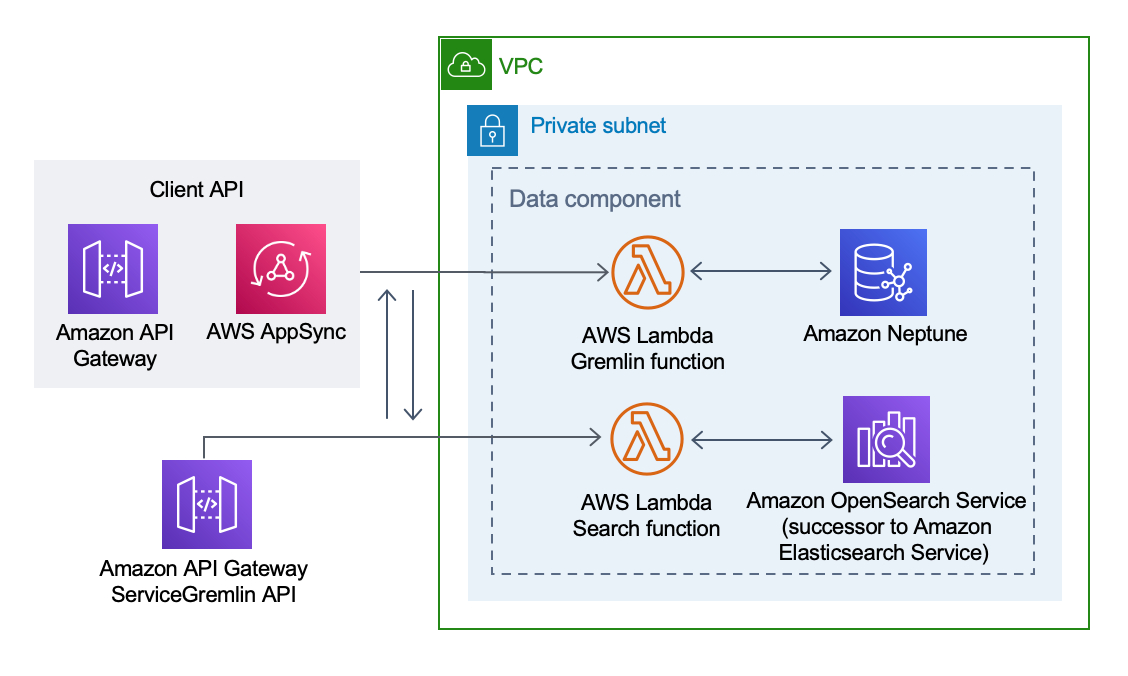
Here’s an example of an AWS architecture diagram for a data component:

AWS Data Component
AWS Data Component

Amazon also provides a large gallery filled with hundreds of real-world architecture diagrams[3]. Check it out!

2. Microsoft Azure#

The Microsoft Azure platform is the second-most popular cloud computing solution and is a great choice if you’re already working with Microsoft products. For hundreds of solutions, you can browse through a catalog of reference architectures

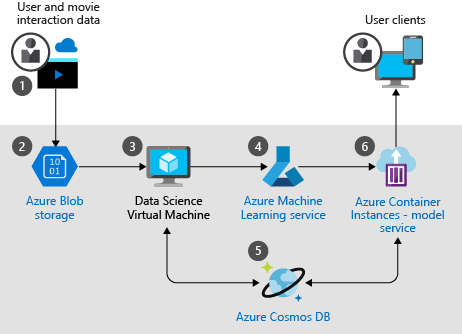
Here’s an example of a reference architecture that describes how a solution uses machine learning to create movie recommendations automatically and at scale.

Azure Reference Architecture Diagram

Microsoft Azure architectures come with a breakdown of the data flow, an explanation of individual components, and potential use cases. Each architecture also includes a performance analysis based on the five pillars of the Microsoft Azure Well-Architected Framework:

  • Reliability: The ability of a system to recover from failures and continue to function
  • Security: Protection of applications and data from threats
  • Cost optimization: Management of costs to maximize the value
  • Operational excellence: Operations processes that keep a system running in production
  • Performance efficiency: The ability of a system to adapt to changes in load

3. Google Cloud Platform (GCP)#

The Google Cloud Platform is a collection of cloud computing services and the third-largest IaaS provider. GCP provides a fantastic resource for quickly diagramming: Google Cloud Architecture Diagramming Tool.

In the Google Cloud Architecture Diagramming Tool, you can drag and drop prebuilt reference architectures straight onto the canvas. When you’re in the diagramming tool, navigate to the Diagrams section and you’ll see over 10 reference architectures for common use cases.

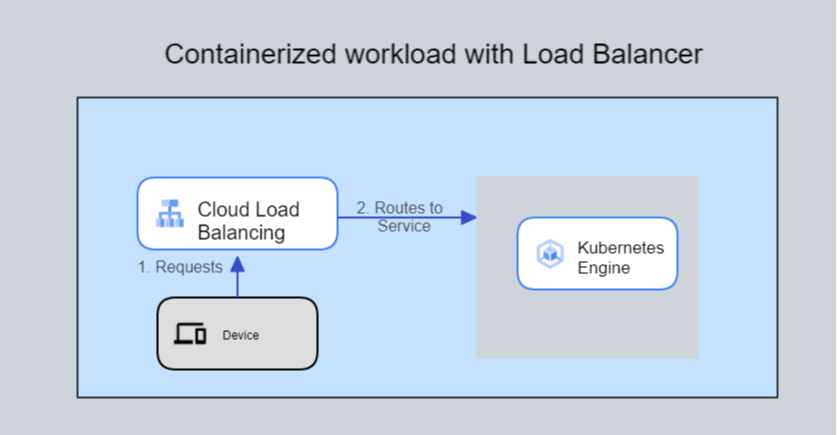
Here’s an example of a reference architecture for a simple, containerized application.

GCP Simple Containerized App

Wrapping up and next steps#

Understanding software architecture is an important skill for any software developer to cultivate. Learning how to diagram those patterns effectively can be a great way to help others understand the architecture you’re working on together.

Furthermore, diagramming is a skill you will need to develop if you plan to be a system designer, cloud architect, or solutions architect. Being able to illustrate a clear vision of a product’s software architecture is critical when communicating with non-technical (and technical) audiences. You want to have a clear idea of how different elements of your software system work and pass that on to whoever joins you on a project. If you ever decide to move on from a project, you can rest assured knowing that things won’t fall apart when you leave.

If you enjoyed learning about software architecture patterns and diagramming, we encourage you to keep learning about system design! System design is a great field for people who like to solve abstract problems and think about the bigger picture.

To get started learning these concepts and more, check out Educative’s Scalability & System Design for Developers learning path.

Happy learning!

Continue reading about system design#

Next: System Design Interview Questions by Company#

Frequently Asked Questions

What are the three types of software architecture?

The three most common types of software architecture are as follows:

  • Layered (n-tier) architecture: Separates concerns into layers (e.g., presentation, business logic, data access), promoting organized and manageable code.
  • Client-server architecture: Divides the system into client and server, with the client requesting services and the server providing them.
  • Microservices architecture: Comprises small, independent services communicating over a network, each focused on specific business capabilities.

Written By: