Displaying a 3D Maze
Explore how to display 3D mazes by extending 2D grid concepts into higher dimensions. Learn to represent multiple levels visually with directional arrows indicating passages. Understand updating grid classes to manage spacing and drawing, and adapt maze generation algorithms like Recursive Backtracker to 3D grids for effective maze creation.
We'll cover the following...
We'll cover the following...
Introduction
We’ll draw these mazes as sets of floor plans, with lower floors to the left and higher floors to the right. The up and down passages, represented by the red arrows in the corresponding cells, indicate which of the adjacent floors each passage leads to. For example, a 3x3x3 maze might look something like this:

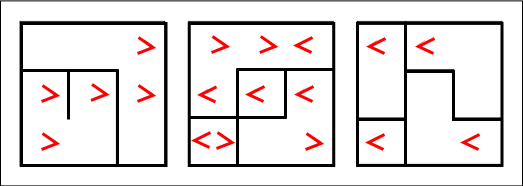
A 3×3×3 maze
Arrows pointing to the right are like stairs leading to the level above them, and ...