2D Geometries: CircleGeometry and RingGeometry
Explore how to create 2D circular shapes using CircleGeometry and RingGeometry in Three.js. Learn to control properties like radius, segments, and angles to customize these geometries for your 3D scenes. Understand how to orient shapes on different planes and create complete or partial circles and rings.
The THREE.CircleGeometry
We can probably already guess what THREE.CircleGeometry creates. With this geometry, we can create a very simple 2D circle (or part of a circle).
Example: Circle geometry
Let’s execute the circle-geometry.js in the playground below:
const path = require('path')
const HtmlWebpackPlugin = require('html-webpack-plugin')
// const CopyWebpackPlugin = require('copy-webpack-plugin')
const fs = require('fs').promises

// we should search through the directories in examples, and use
// the name from the files to generate the HtmlWebpackPlugin settings.
module.exports = async () => {

  return {
    module: {
      rules: [
        {
          test: /\.glsl$/i,
          use: 'raw-loader'
        }
      ]
    },
    mode: 'development',
    entry: {
      'chapter-5': './samples/chapters/chapter-5/circle-geometry.js',
    },
    output: {
      path: path.resolve(__dirname, 'dist'),
      filename: 'bundle.js',
      publicPath: '/',
    },
    plugins: [
      new HtmlWebpackPlugin(),
    ],
    experiments: {
      asyncWebAssembly: true
    },
    devServer: {
       allowedHosts: 'all',
       host: '0.0.0.0',
       port: '3000',
       static: [
        {
          directory: path.join(__dirname, 'assets'),
          publicPath: '/assets'
        },
        {
          directory: path.join(__dirname, 'dist')
        }
      ]
    },
  mode: 'development',
  }
}
Note: We can change the properties of the geometries from the right control panel in the output screen.
In the following screenshot, we can find an example where we created a THREE.CircleGeometry object with a thetaLength (line 9) value that is smaller than 2 * PI:

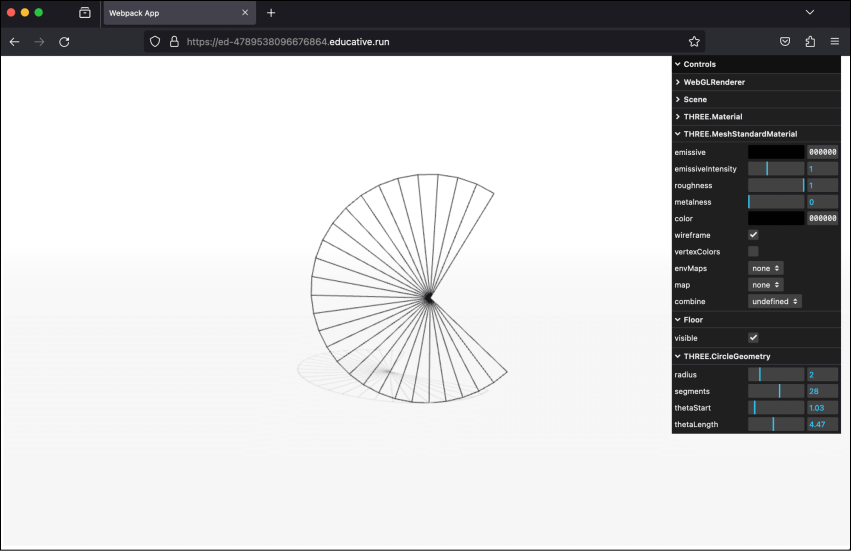
In this example, we can see and control a mesh that’s been created by using THREE.CircleGeometry. 2 * PI represents a complete circle in radians. If we’d rather work with degrees than radians, converting between them is very easy.
The following two functions can help us convert between radians and degrees:
When we create THREE.CircleGeometry (line 13), we can specify a few properties that define what the circle looks like, as follows:
...