3D Geometries: TorusGeometry and TorusKnotGeometry
Explore how to create and manipulate 3D donut and torus knot shapes using Three.js. Learn to adjust parameters such as radius, segments, and arcs to customize these geometries for web-based 3D scenes.
The THREE.TorusGeometry
A torus is a simple shape that looks like a donut. The following screenshot shows THREE.TorusGeometry in action:

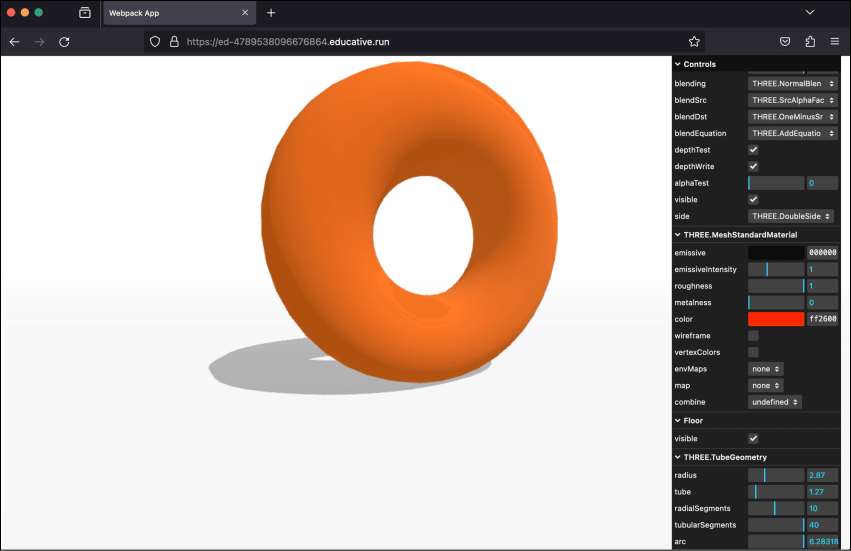
3D TorusGeometry
Example: TorusGeometry
Let’s execute the torus-geometry.js example in the below playground by clicking the “Run” button:
const path = require('path')
const HtmlWebpackPlugin = require('html-webpack-plugin')
// const CopyWebpackPlugin = require('copy-webpack-plugin')
const fs = require('fs').promises

// we should search through the directories in examples, and use
// the name from the files to generate the HtmlWebpackPlugin settings.
module.exports = async () => {

  return {
    module: {
      rules: [
        {
          test: /\.glsl$/i,
          use: 'raw-loader'
        }
      ]
    },
    mode: 'development',
    entry: {
      'chapter-5': './samples/chapters/chapter-5/torus-geometry.js',
    },
    output: {
      path: path.resolve(__dirname, 'dist'),
      filename: 'bundle.js',
      publicPath: '/',
    },
    plugins: [
      new HtmlWebpackPlugin(),
    ],
    experiments: {
      asyncWebAssembly: true
    },
    devServer: {
       allowedHosts: 'all',
       host: '0.0.0.0',
       port: '3000',
       static: [
        {
          directory: path.join(__dirname, 'assets'),
          publicPath: '/assets'
        },
        {
          directory: path.join(__dirname, 'dist')
        }
      ]
    },
  mode: 'development',
  }
}
Explore the properties of THREE.TorusGeometry
Note: We can change the properties of the geometries from the right control panel in the output screen.
Properties of THREE.TorusGeometry
Just like most of the simple geometries, there aren’t any mandatory arguments when creating THREE.TorusGeometry. The following list mentions the ...