Advanced Geometries: BoxLineGeometry and RoundedBoxGeometry
Explore advanced geometries in Three.js by learning how to create outlined boxes using BoxLineGeometry and rounded corner boxes with RoundedBoxGeometry. Understand their properties including dimensions, segments, and radius to design intricate 3D shapes.
The BoxLineGeometry
If we just want to show the outline, we can use THREE.BoxLineGeometry. This geometry works exactly like THREE.BoxGeometry, but instead of rendering a solid object, it renders the box using lines, as shown below:

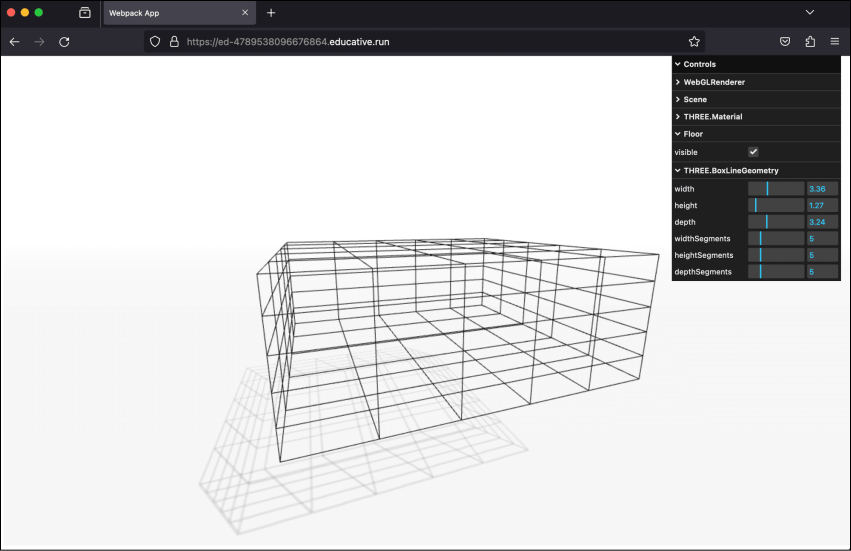
A box rendered using lines
Example: BoxLineGeometry
Let’s execute the box-line-geometry.js ...
const path = require('path')
const HtmlWebpackPlugin = require('html-webpack-plugin')
// const CopyWebpackPlugin = require('copy-webpack-plugin')
const fs = require('fs').promises

// we should search through the directories in examples, and use
// the name from the files to generate the HtmlWebpackPlugin settings.
module.exports = async () => {

  return {
    module: {
      rules: [
        {
          test: /\.glsl$/i,
          use: 'raw-loader'
        }
      ]
    },
    mode: 'development',
    entry: {
      'chapter-6': './samples/chapters/chapter-6/box-line-geometry.js',
    },
    output: {
      path: path.resolve(__dirname, 'dist'),
      filename: 'bundle.js',
      publicPath: '/',
    },
    plugins: [
      new HtmlWebpackPlugin(),
    ],
    experiments: {
      asyncWebAssembly: true
    },
    devServer: {
       allowedHosts: 'all',
       host: '0.0.0.0',
       port: '3000',
       static: [
        {
          directory: path.join(__dirname, 'assets'),
          publicPath: '/assets'
        },
        {
          directory: path.join(__dirname, 'dist')
        }
      ]
    },
  mode: 'development',
  }
}
Explore the properties of BoxLineGeometry
...