Working with Basic Lights: SpotLight
Explore how to create and manipulate the THREE.SpotLight object in Three.js to add cone-shaped, directional light to your 3D scenes. Understand key properties like angle, distance, penumbra, and shadow controls to achieve realistic lighting and shadow effects. Learn how to target lights, debug with helpers, and fine-tune shadows for better visual quality.
Types of light emitting sources
Before we discuss THREE.PointLight, THREE.SpotLight, and THREE.DirectionalLight, first, let’s highlight their main difference–that is, how they emit light. The following diagram shows how these three light sources emit light:


We can see the following from this diagram:
THREE.PointLightemits light from a specific point in all directions.THREE.SpotLightemits light from a specific point in a cone-like shape.THREE.DirectionalLightdoesn’t emit light from a single point but emits light rays from a 2D plane, where the rays are parallel to each other.
The THREE.SpotLight
THREE.SpotLight is one of the lights we’ll use often (especially if we want to use shadows). THREE.SpotLight is a light source that has a cone-like effect. We can compare this with a flashlight or a lantern. This light source has a direction and an angle at which it produces light. The following screenshot shows what a THREE.SpotLight looks like:

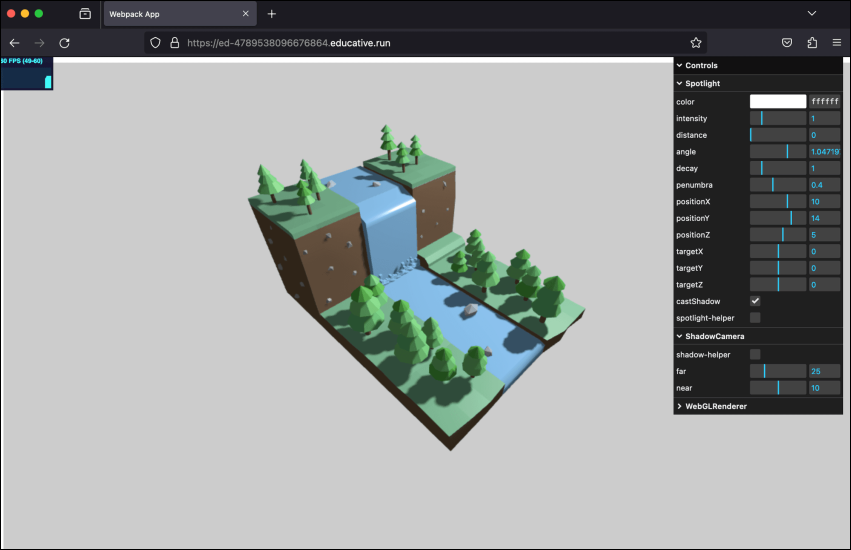
Example: Spotlight
Let’s execute spotlight.js example in the playground below by clicking the “Run” button:
const path = require('path')
const HtmlWebpackPlugin = require('html-webpack-plugin')
// const CopyWebpackPlugin = require('copy-webpack-plugin')
const fs = require('fs').promises

// we should search through the directories in examples, and use
// the name from the files to generate the HtmlWebpackPlugin settings.
module.exports = async () => {

  return {
    module: {
      rules: [
        {
          test: /\.glsl$/i,
          use: 'raw-loader'
        }
      ]
    },
    mode: 'development',
    entry: {
      'chapter-1': './samples/chapters/chapter-3/spotlight.js',
    },
    output: {
      path: path.resolve(__dirname, 'dist'),
      filename: 'bundle.js',
      publicPath: '/',
    },
    plugins: [
      new HtmlWebpackPlugin(),
    ],
    experiments: {
      asyncWebAssembly: true
    },
    devServer: {
       allowedHosts: 'all',
       host: '0.0.0.0',
       port: '3000',
       static: [
        {
          directory: path.join(__dirname, 'assets'),
          publicPath: '/assets'
        },
        {
          directory: path.join(__dirname, 'dist')
        }
      ]
    },
  mode: 'development',
  }
}
Note: We can change the properties of the spotlight from the right control panel in the output screen. ... ... ...