Search⌘ K
AI Features

Simple Materials: MeshNormalMaterial

Explore how the MeshNormalMaterial in Three.js uses vertex normal vectors to render faces with varying colors and shading effects. Learn about flat and smooth shading options and how Three.js computes normals automatically to enhance 3D object visualization without manual calculations.

The THREE.MeshNormalMaterial 

The next material is also one where we won’t have any influence on the colors used in rendering. The easiest way to understand how this material is rendered is by first looking at an example:

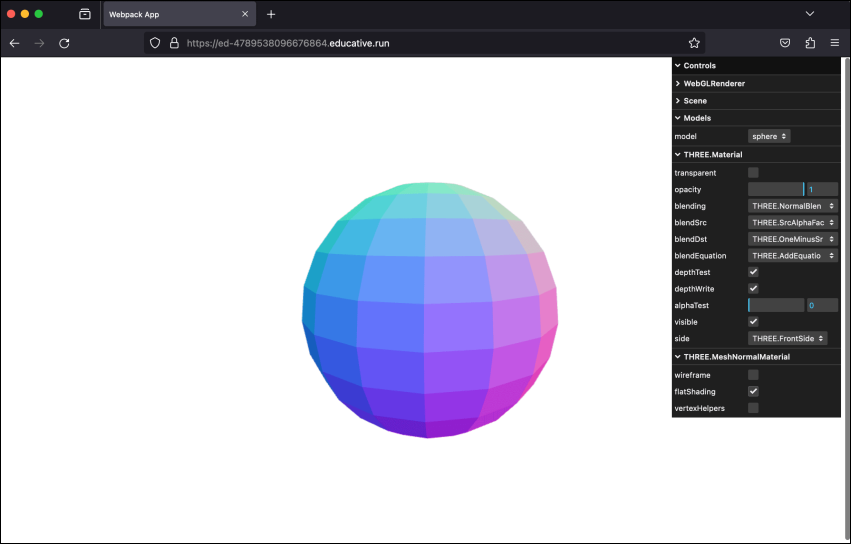
Mesh normal material 

Example: Mesh normal material

Let’s click the “Run” button to execute the mesh-normal-material.js example in the playground below and enable flatShading

const path = require('path')
const HtmlWebpackPlugin = require('html-webpack-plugin')
// const CopyWebpackPlugin = require('copy-webpack-plugin')
const fs = require('fs').promises

// we should search through the directories in examples, and use
// the name from the files to generate the HtmlWebpackPlugin settings.
module.exports = async () => {

  return {
    module: {
      rules: [
        {
          test: /\.glsl$/i,
          use: 'raw-loader'
        }
      ]
    },
    mode: 'development',
    entry: {
      'chapter-4': './samples/chapters/chapter-4/mesh-normal-material.js',
    },
    output: {
      path: path.resolve(__dirname, 'dist'),
      filename: 'bundle.js',
      publicPath: '/',
    },
    plugins: [
      new HtmlWebpackPlugin(),
    ],
    experiments: {
      asyncWebAssembly: true
    },
    devServer: {
       allowedHosts: 'all',
       host: '0.0.0.0',
       port: '3000',
       static: [
        {
          directory: path.join(__dirname, 'assets'),
          publicPath: '/assets'
        },
        {
          directory: path.join(__dirname, 'dist')
        }
      ] 
    },
  mode: 'development',
  }
}
Explore the properties of THREE.MeshNormalMaterial

Note: We can change the ...