Declare Non-Nullable Variables, Parameters, and Check for Null
Explore how to declare non-nullable variables and parameters in C# with nullable reference types enabled. Understand how to assign and check for null values, handle compiler warnings, and use the null-conditional operator to write safer and more reliable code. This lesson guides you through practical steps to prevent null-related exceptions in your applications.
We'll cover the following...
If we enable nullable reference types and we want a reference type to be assigned the null value, then we will have to use the same syntax as making a value type nullable, that is, adding a ? symbol after the type declaration.
Enabling nullable reference types
So, how do nullable reference types work? Let’s look at an example. When storing information about an address, we might want to force a value for the street, city, and region, but the building can be left blank, that is, null:
Step 1: In NullHandling.csproj, add a class file named Address.cs.
Step 2: In Address.cs, add statements to declare an Address class with four fields, as shown in the following code:
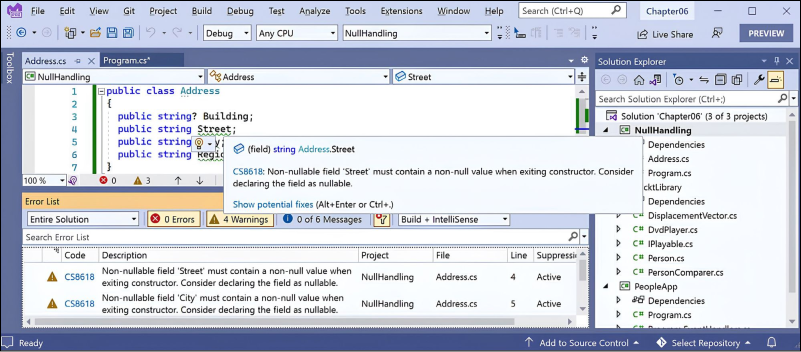
Step 3: After a few seconds, note the warnings about non-nullable fields, like Street not being initialized, as shown in the figure:

Step 4: Assign the empty string value to each of the three non-nullable fields, as shown in the following code: